šŸ’æ hapaxOS PUBLIC BETA 2.30 D

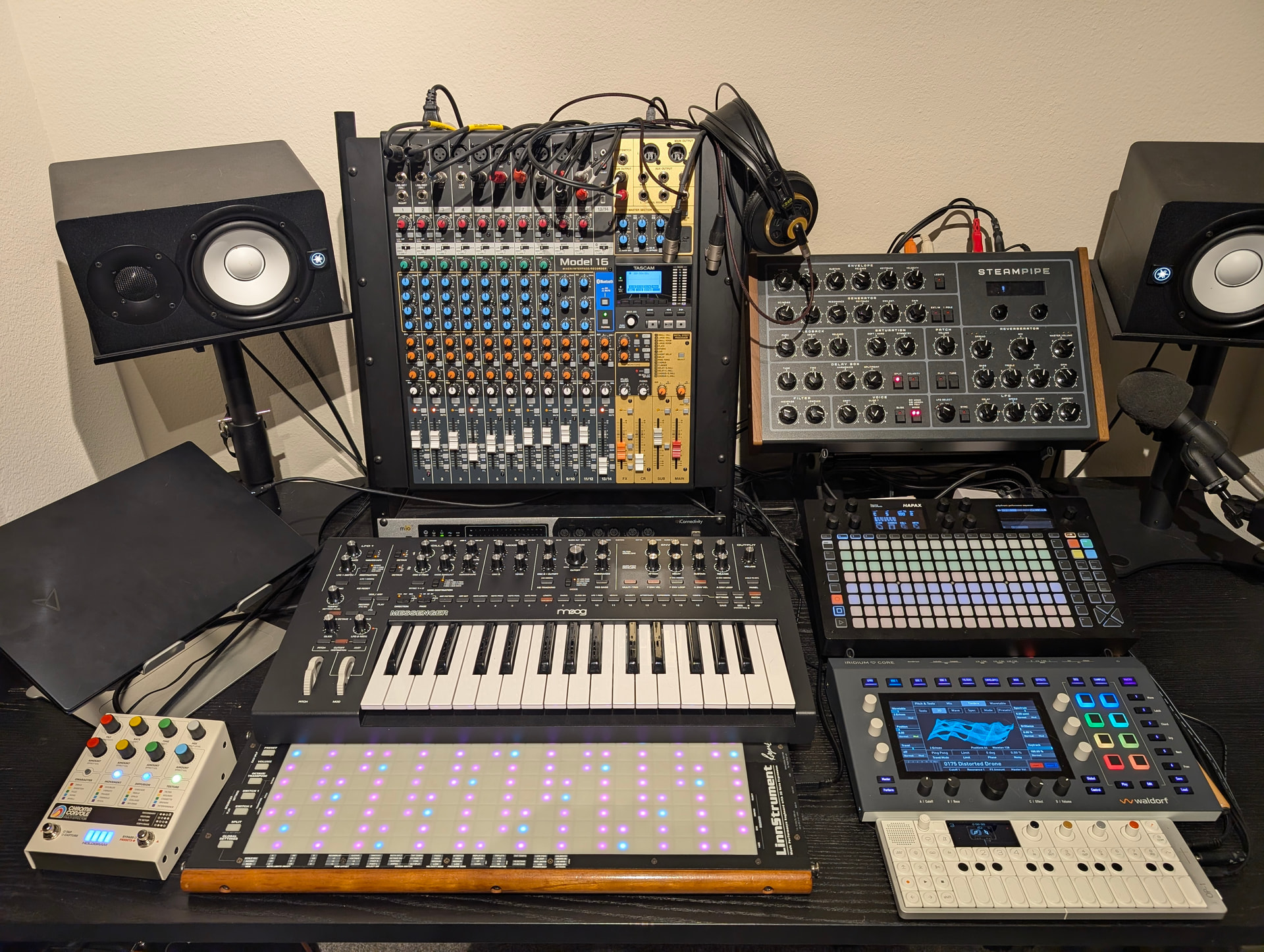
I figured I would share my setup with virtual cables since it is probably fairly unique. The Virtual Cables have completely changed how I handle midi in my setup. Everything is much simpler (after initial setup). It also fixes most of my gripes with MPE on the Hapax. This setup also easily works DAWless or with a DAW without any major adjustments.

I am using both the USB Host and USB Device ports in this setup. These (plus power) means that there are only 3 cables connected to the Hapax. This gives me 32 independent Midi outputs.

The USB Device port is connected directly to my laptop. I have Bitwig configured to receive all 16 tracks of the Hapax as independent Midi devices. This allows me to sequence 16 MPE tracks without worrying about channel allocation. I just select my Hapax Track number as a midi in device in Bitwig, and everything works very simply.

But where my setup is neat is the USB Host port!! I have this connected to the iConnectivity Mio 10 (the older model of what is out now, the silver and black rack thing behind the Moog). The Mio is designed to be connected to up to two PCs for routing midi to/between hardware and PCs. I am connecting the Hapax to the Mio using the Mio’s 2nd PC connection. The Mio recognizes all 16 virtual cables from the Hapax when connected via this port.

The Mio has 10 physical Din Midi ports, and also supports 10 USB Midi devices (when using an external USB Hub). Using the routing in the Mio, I can essentially give 10 Virtual Cables their own independent physical Midi input/output, as well as connect 6 additional independent USB Host devices. Each of these connections get their own Midi messages with no crossover. All of my hardware devices can be MPE, or even be set to Omni midi channels, because they do not receive any messages intended for the other instruments.

This is especially nice with the Instrument Definition files!! I just load the Instrument Definition that matches my instrument, and the Hapax track will only go to that specific hardware port that matches that instrument. It is like loading a plugin.

The Mio is also connected to Bitwig via its primary PC connection (using their version of virtual cables as well), so I can have the Hapax send midi to bitwig for processing/recording and send that out to hardware as desired, or I can bypass Bitwig all together and route directly to hardware for DAWless playing, all from the Hapax without touching an editor.

So, the Hapax Virtual Cables are configured to:

USB Device 1-16 = 16 Bitwig Tracks

Host 1: Waldorf Iridium (MPE)

Host 2: Erica Synths Steampipe (MPE)

Host 3: Moog Messenger

Host 4: Drum Sample Pad (off screen)

Host 5: Chroma Console

Host 6: Midi for my guitar pedalboard (off screen)

Host 7-10: the empty midi ports (so I can just plug less used devices in as desired)

Host 11: Linnstrument (MPE Input to Hapax)

Host 12: OP1

Host 16: Clock + Transport (The mio is set to route this Virtual Cable to all hardware devices. The Hapax currently only allows this to be sent via one virtual cable per physical connection. I assume this is for bandwidth reasons. I have so many ports and can merge midi in the Mio so this is not a problem even though it felt weird in the moment I figured it out lol).

Issues: this is fairly minor, but for now, the Linnstrument is the only device configured to send midi to the Hapax. Before the update, I was using an active track port to use a master midi keyboard. I had all of my Instrument Definitions set up to receive midi directly from each synth, so I could record knob movements directly from any instrument without it affecting other tracks, while everything could be played by the master keyboard. The active track port setting currently lets you pick USB Host or USB Device, but it seems to accept data from all 16 Virtual Cables, and does not allow the user to select just one. Ideally, I could set my active track port to Host 11 (the Linnstrument), and then configure my instrument definitions to accept data from the other cables as needed. If I really wanted to bypass this issue for now, I could just connect the Linnstrument to the Midi Din A Input of the Hapax, but that would be a 4th cable lmao.
6 Likes

Any chance we could see mass export of MIDI files in a project? It’s a huge pain to go through every pattern and do it manually.

2 Likes

I was joking! I use the iPad for my dawless setup :squinting_face_with_tongue: MPE & VIRTUAL CABLES is a great adddition to the Hapax :star_struck: THX Squarp

Quite a niche update. I would like to see internal virtual cables…

And, I have no problem to pay for updates if it can speed things.

1 Like

in a way you have internal routing already. what specifically were you desiring? i already asked about cables from the ā€˜output’ fx and i guess its coming

How does Hapax have internal routing?

I can’t route the output of track A to the input of track B as far as I know.

between modulators. do you want more fx? how would you use rerouting like that? with a hardware or software routing solution it could be a reality

I want to, at least, be able to route any track(or output effect) output to any track input.

To me that’s basic internal routing and something I use as a fundamental building block in my DAW.

i get that but what purpose would routing that way serve? what possibilities would it open up? it may be possible with other gear. even as simple as a midi cable.

are you trying to record the output to an empty track?

I do it all the time in order to compose sequences and melodies with multiple fragments.

A simple example would be something like this:

Track 1 contains core melodies with simple variations in different patterns

Track 2 has patterns with various kinds of fills that works with Track 1

Track 3 also has fills that works with either track 1 or Track 1+2, or Track 2 alone

Track 4 contains patterns with filter sweeps, velocity changes or other modulation.

All this is output to track 5 which have some effects like arp and echo. These can also easily be controlled with Track 5 patterns. Or perhaps Track1-3 outputs to Track4 which then outputs to Track5. Or the other way around. Or perhaps not a fixed routing at all

This way I can compose a lot of different variations, build ups, intros and outros simply by triggering different patterns.

3 Likes

Could you explain how you set up tracks 1-4 to output to 5? I think I am missing something simple.

Plug Midi out(1-4) to Midi in(5), set track 5 to listen to the specific input port and have a different output port for track 5 than 1-4, I guess.

In Hapax I don’t do that, because Hapax doesn’t support internal routing like that as far as I know.

Not as comprehensive but could you achieve some of that with the output effect?

My weekend project will be reconfiguring my setup after grabbing the latest firmware and on paper it’s similar to yours, so thank you for the inspiration!

MioXL for MIDI Routing

AudioFuse 16Rig for Audio Interface

Mac Studio connected to MioXL via ethernet/RTP for DAW / AUV3 hosting

Electra.One Mk2 for remote control (AUV3, has a MioXL overlay for replicating AuracleX, serves up the hidden features of the Matriarch)

Matriarch instead of a Messenger

Osmose (49 key) instead of the Linnstrument

Essence FM instead of a Iridium (way different creatures, but also supports MPE and has gobs of voices / polyphony / outputs)

I’m curious: do you incorporate a tablet in your setup at all? Seems like it’d be competing with the mac as a sound source/DAW, but I’d like the flexibility and curious how you might fold that in.

Thanks again; you helped me wrap my head around how the virtual cables might work with hardware for MIDI routing! Just have to roll up my sleeves and get to it.

1 Like

Not really since that would bypass the effects that I want everything to pass through.

Wow, that is an eerily similar setup haha!

I do not have a tablet, just the windows PC, so you probably have a bit more experience with that than I do.

Once the Virtual Cable gets to the Mio though, I imagine it is pretty easy to just send it to the tablet just like you do currently? Really, the only thing the Virtual Cables are changing is where the midi gets into the Mio, and simplifying the wiring. Instead of routing Din 1 to the iPad, you would be routing PC 2-Port 1 to the iPad for example.

The biggest thing to keep in mind is that while the Mio does not automatically load the cable names from the Hapax, they are in the same order. The 5th port on the list in the Mio is equal to Host 5 on the Hapax. You can just rename each port to whatever makes sense to you in the iconnect software.

Hopefully they will add an Input effect, or just allow the Output to route to any other track’s input

1 Like

I guess you’re mixing up ā€œdeviceā€ and ā€œhostā€, right?

great to hear that the mio10 is able to ā€œseeā€ all virtual cables. Hopefully, it works similar with my mioXL, although it does only have 1 usb port to connect to a pc, so I will need to use rtp (network) midi be able to connect both my pc and Hapax to the mioXL that way I guess..

Hello @tom ,

I have Spacecraft on my iPad and use KB-1 Expression Keyboard with MPE preset on my iPhone 8 Plus ( 3D touch pressure :winking_face_with_tongue: ) everything works like a charm if I go straight from the iPhone to the AUDIO4c MIDI connected to the iPad BUT if I go thru the Hapax with:

INPUT: MIDI A MPE 1…16

OUTUP: USBdev 2…16 lowerZ

The MIDI IN setting ACTIVE TRACK CHANNEL = ALL (MPE CONTROL)

SLIDE UP/Down doesn’t work anymore :face_in_clouds: ( Glide OK, Pressure OK )

Any idea what I’m doing wrong please?

Thx