Yeah I don’t know either, maybe cause I used IA to redact  glad its helpful
1 Like
Just spent the morning sorting this out with the older mio10. Previously, I had one output from the Hapax being split by the mio amongst a bunch of rack gear - all multi-timbral, but because it was only one DIN out from the Hapax I had to be careful about which channels I was using with what gear.
Second DIN out from the Hapax was for mono-timbral desktop/keyboards, whilst the third was for Drum machines.
I’ve just swapped to using the USB virtual cables and it’s mad tbh. I now have one USB cable that can control pretty much everything, one DIN cable from the Hapax which goes to one of the mio’s midi inputs and is used for clocking it all (clean separation of clock and data etc…) and another DIN to my 1010 blackbox, because for some reason 1010 didn’t think to put a functioning USB Host port on the back!
Need to go through and re-do my templates and default project, but genuinely the ability to address all 16 channels per DIN on the mio via USB is amazing.
I don’t have RTP midi set up, and seeing how Windows 11 is breaking MIDI at the moment, would rather not risk it at the moment, so I’m sort of left with an annoying USB cable off the front of the mio. Oh well.
3 Likes
A couple of other questions related to your setup. Is it correct you are not using the USB Device port of the Hapax?
When you want to use the DAW are you using RTP streams for your take 5, Access virus, Hydrasynth?
And do you have two (or more) presets on the Mio (one for lawless with Hapax) and one for with DAW?
Thanks
Joost
Super interesting topic!
I was thinking on another setup (I didn’t tested it yet, I’m at the whiteboard stage  ),
),
I’m using a Conductive Labs MRCC, not a iConnectivity Mio, I’m very interested in this device too.
Here’s my plan:
I’m using 3 MPE controllers. Yep. Greedy. They go straight to my MRCC, from their USB device port to MRCC USB host ports (each exposes 4 Virtual MIDI port in case useful). The MRCC distributes MIDI through its DIN outputs to the DIN inputs of my synths. I hope there will be no bottleneck at this stage. That’s for real-time playing my synths.
Now for sequencing in a Dawless setup, I plug my Hapax device port to one another host port of the MRCC (which has 4 USB host ports total). So MRCC will route the Hapax clock and all its tracks data to the synths. Again, I still have to test against bottleneck issues there, or jitter.
In a DAW scenario, I plug the USB device port of the MRCC to the PC (Ableton), which exposes 12 virtual MIDI ports, so I can play/sequence VSTs. Hapax remains the center of my setup.
All this is in my brain though, not yet tested!
I hope I’m not going the wrong direction here.
Hey Joost, that’s correct. I’m exposing the synths via RTP to capture them into the DAW, As for the mioXM, I’m only using one preset for now since currently I’m fully focused on the jamming and live-performance aspect of my workflow. I use Reaper to capture the session (when I don’t forget to which is almost always) and have a template with all things routed into their own audio or midi tracks.
Shameless plug: I actually just recorded a jam with this exact routing if you want to hear (it takes shape around the 2 mins mark): https://hearthis.at/cuatroseises/jam-mix-2026-03-10/"
1 Like
Is it pretty easy to setup this routing in the Mio software? I also want to run my USB from the hapax into the MioXL, and use that to send and receive MIDI to all my hardware and also into my DAW. I mainly want the MIDI coming back to reflect program changes and things like that on synths, but also to record MIDI back into the Hapax from the DAW if I want.
I also have a clean sync clock going into the DIN in of the Hapax from a Nome 2 (hapax sync input is set to clock course : MIDI auto and start/stop is + clock source. I have usb virtual blank in this menu). This lets me either receive clock from the DAW when needed, but I can also go DAWless and hit play on hapax and that will send it’s clock. I currently am sending all the MIDI data and clock out of hapax into a Thru-5.
So I am guessing you would set it in the software so that Din cable just sends clock and maybe start/stop? And then the USB from hapax sends all MIDI info and no clock.
So basically you can sequence and sync an entire studio with 1 DIN cable and 1 USB, if I have this correct. And in theory I could give each piece of gear it’s own entire virtual DIN cable if I wanted.
The other question I have is how do you set the output in the Definition file if you do it this way. I believe it would be USBD and then the output channel? But for getting MIDI back in, how do you set the input up?
Sorry for all the questions, just trying to avoid a MIDI loop or something crazy like that. Between setting it up right in ableton and then the MIDI software, I am sure it can be easy to screw this up.
I just got Hapax today but I already run two MIOXL with a Cirklon connected to the “computer” port on #1 and MPC Live connected to the computer port on #2 with all of my instruments connected to the DIN and USB spread across both. Then the XLs connect to each other and the computer over RTP Ethernet cable and it’s rock solid.
1 Like
I got my MioXL and its pretty simple to setup. I just want to make sure I have this right - in Auracle, how do you have your filter and remap settings? I just went and set it so my input for the Clock sync DIN (going into a HAPAX din port) has all the channel filter MIDI blocked out (blue) and the system filter is unchecked. I did this for both the input and output, so hopefully that means just timing info is sent through that DIN port now. I then went to the hapax USB and did the opposite, so all the system filter info with sync..etc is marked blue for input and output.
Guessing this is the way to do it. Auracle crashed on me 3 or 4 times during the process but remembered all the changes so I should be good.
Hey too bad for the crashes, its been rock solid for me, I haven’t had the need to touch the remap/filtering settings yet, everything is default there
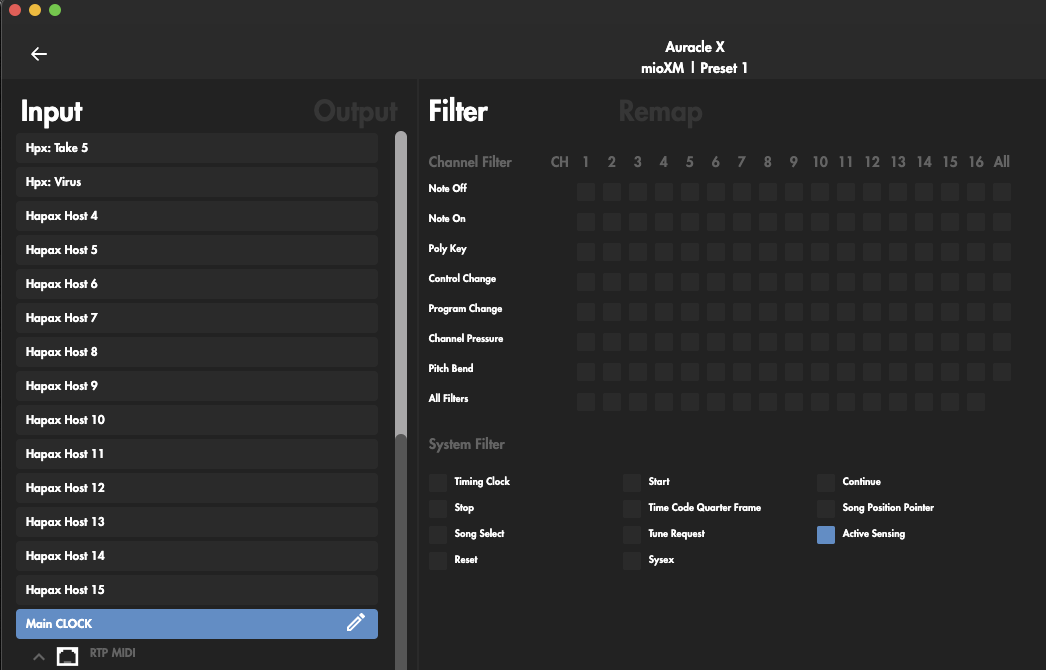
I use that “Main Clock” Hapax Virtual Cable to send only the clock through it, you can set it Hapax > Settings > Sync Output > USB Host: “Clock + Transport Cable 16”
This way I can do this:
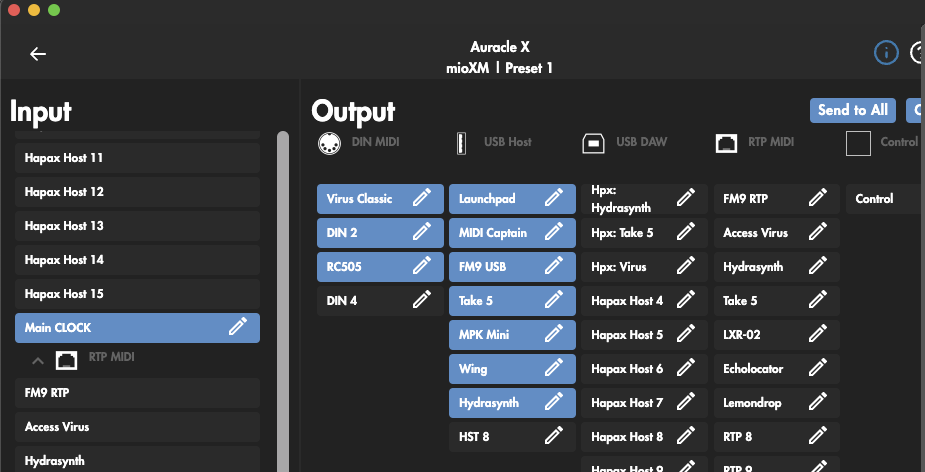
I can then, if needed, go to the “Take 5” USB input in remap/filtering and mark “start’, “stop”, “continue” to prevent the Take 5 sequencer to start playing when I hit play on the Hapax.
Hope this helps 
2 Likes
I have the same setup (your advise was used) and working like a charm.
1 Like
Great, I am using the USB out of Hapax to send the MIDI data and it’s DIN to send clock but it’s basically the same thing. I totally forgot I filtered the “send clock” out of the USB on the Hapax settings. So doing it in the Auracle software is not even needed.
Appreciate the help, the MioXL has been much needed. It allows me to plug in my USB midi controllers, power them and instantly route them to everything however I want. Plus I have all my synths and samplers connect to one device instead of daisy chaining with thru boxes.
My only question in Auracle where you can reserve the USB ports so they map to the plugged in devices - a keystep 37 is easy because it has 1 item in the dropdown, but the Hapax has a bunch and we can only select 1. I just selected the first Hapax port, which I am assuming is fine. Just making sure I did that correctly.
yes thats how it works if you connect the hapax into the mio usb host, the XM provides 8 slots and you have to bind a slot to any port porvided by any usb thing connected. in your case, if you need it, you have to manualy reserve the virtual cables hapax provides, but if you use all the slots for the hapax then you’ll not be able to use any more usb controllers/synths in the mio.
1 Like
Ok thank you, now I understand it. Appreciate the help.
I have one more question for anyone on the newest firmware. In the instrument definitions, how do we label our synths and drum machines if the data is going out of the Hapax USB Data port? I understand that it should say USBD, but now we have 16 ports of those. So do you just type USBD1 for port 1?
@BoogieDown Yes I have a MioXL and MioXM that I have used both with the Hapax. I have a large system and use a lot of ports. When I use the Hapax with just the MioXl I use the Host port. The way it will look is USBH1 for port 1, USBH2 for port 2, USBH2 for port 2, USBH2 for port 2, and so on. I use 8 to 10 ports on the MioXL.
I am have just set up the computer on USBD to work as a midi bridge/Midi Device.
1 Like
@sgarza looking at moving to a similar setup that you have. I have a Hapax but not mioXL/XM. Would really help if I could clarify a couple of things; may well be me being dense and missing something obvious…
Given USB is not bandwidth limited by MPE is there a significant benefit in separating out the clock on one virtual cable and then merging it back later to go out from the mioXL via DIN?
Looking through the screenshots of your Auracle routing I’m a bit confused: are the Hapax Host ports (in the USB-DAW section) inputs or outputs? You have Launchpad routed to Hapax ports labelled Virus and Take 5 - how does that data then get routed to those synths? Or is it 16 bidirectional connections effectively equivalent to 32 DIN connections? I had in my mind that each of the 16 virtual ports on the Hapax host port would either be an input or an output depending on context.
I packed mine up for a move but I’m going to start from scratch when I set up the studio again. I was getting midi loop back errors and need to study the mio software better I guess.
Hey @matg
First, about the USB bandwith, yes USB is capable of handling mpe + clock, the real issue is not the bandwidth its the drifting (in the clock events), since all the events are transmited serially (one after the other) this introduces clock drifting and it can be a problem on the receiving external gear.
The Hapax acts as a clock master and I’ve it setup so the midi clock goes out through Hapax’s the virtual cable #16. Then on the Mio I route that to the gear that needs clock. This way the clock is always stable.
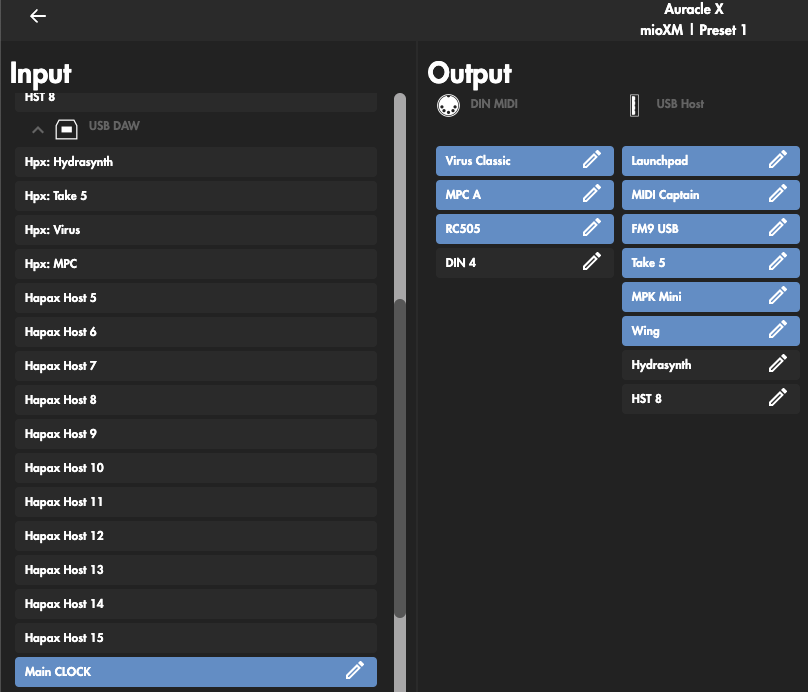
The Hapax USB host (A) port is connected to the mio USB (B) port and all the 16 hapax virtual cables are assigned to the 16 slots the mio has in the USB-DAW section, those are inputs and outputs.
I have routed the launchpad to both Take5 and Virus on the hapax but those are not the hardware, they are just virtual cables labeled with the synth names as I use those virtual cables exclusively for that hardware, so in the hapax I have a track with the INPUT and OUTPUT set to USB (host) virtual cable #2 and in the mio the USB-DAW slot 2 (labeled hpx: take 5) is routed to the actual synth which is connected into the mio USB HOST port:
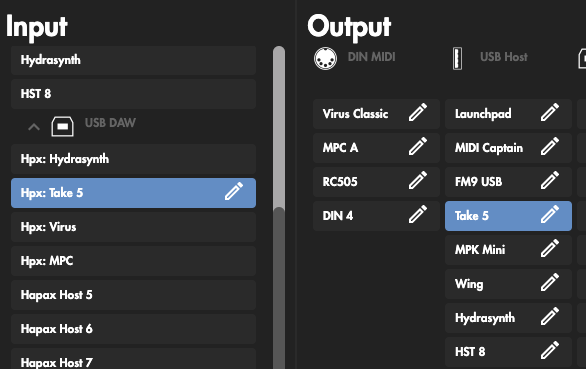
Its complex but it works for me.
Hope this clarifies it, let me know if you have more questions.
Thanks for the reply and more detailed info.
It all makes a lot more sense now that I’ve realised the 16 virtual cables are virtual usb cables (i.e. bidirectional) rather than 16 ‘standard midi cables’ which would individually be either input or output.
Coming back to the separate clock… if I have an MPE synth that needs clock too, and have it connected to a mioXL host USB port am I going to see improved timing if I send the mpe data and clock via separate virtual cables from the Hapax, and then merge them again in mioXL routing to go out to the synth? This would suggest that separating the data improves Hapax’s ‘scheduling’ (if that is the right term) and mioXL is somehow better at merging note and clock than the Hapax?
With the launchpad going to Take 5 and Virus virtual cables preumably your determining which sequences do to each synth by Midi channel?
Last question (!) - how do you control the mioXL via Auracle X if the Hapax is connected to the mioXL DAW USB port? Can Auracle connect to mioXL over the network?
Thanks for all the help; much appreciated.
Yes, I control mioXL over network cable (direct utp connection laptop ↔ mioXL) since usb port is already occupied. Works like a charm!
Yes that is the theory
yes, channel 1 goes to the take 5, channel 9…16 go to 8 different parts/timbers in the access virus.
As @Hajo pointed, Auracle detects the mio if its connected in the same network.