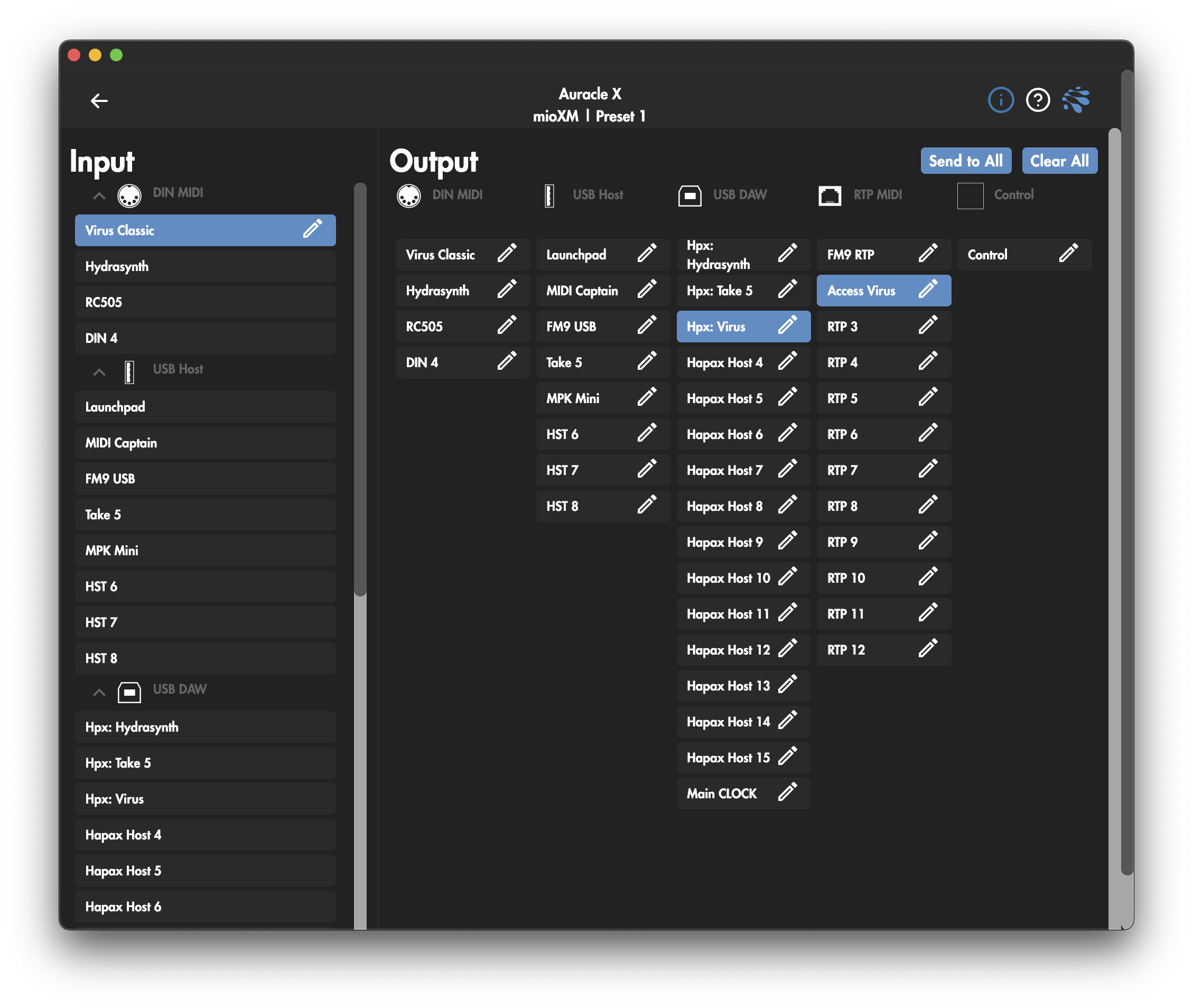
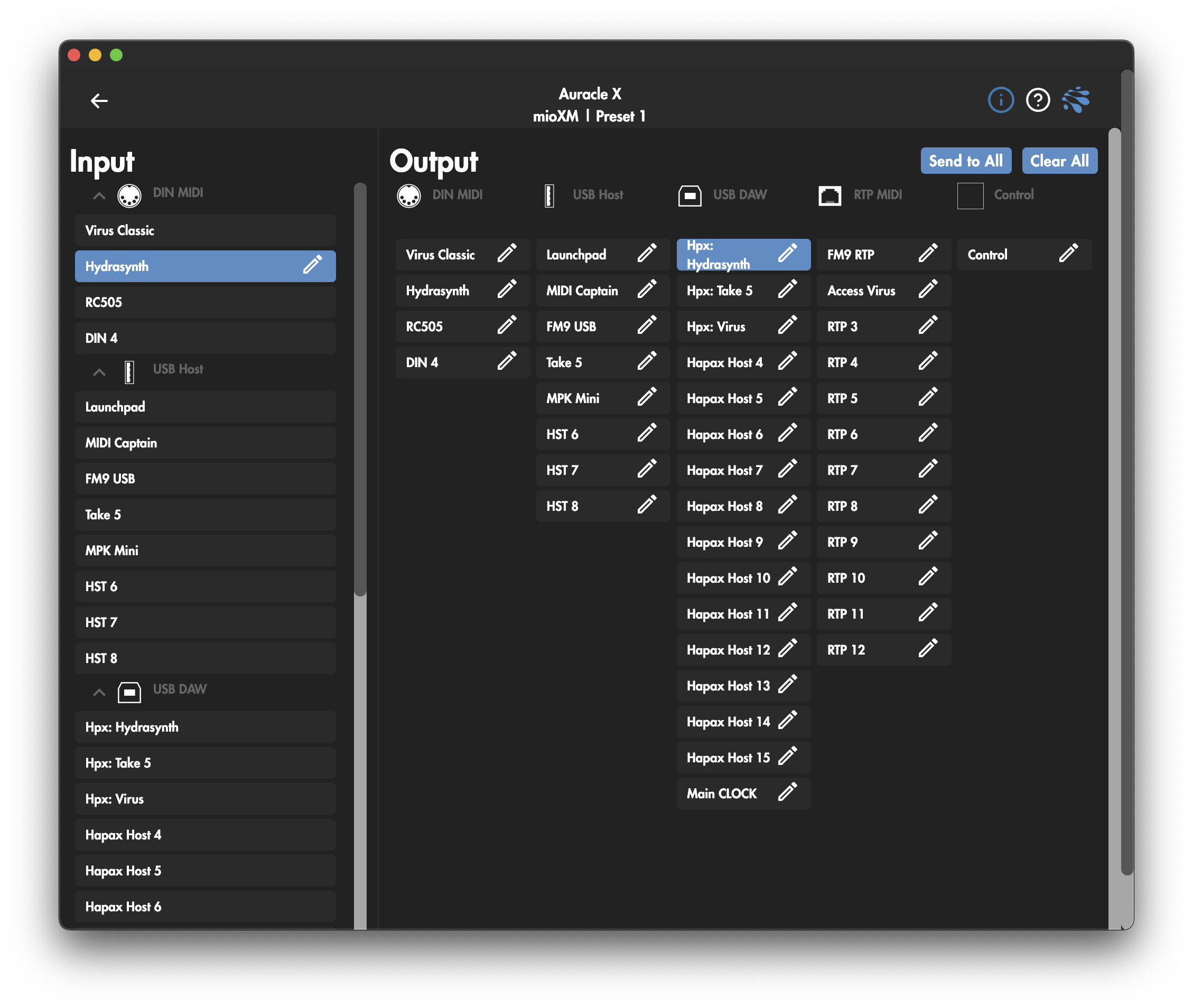
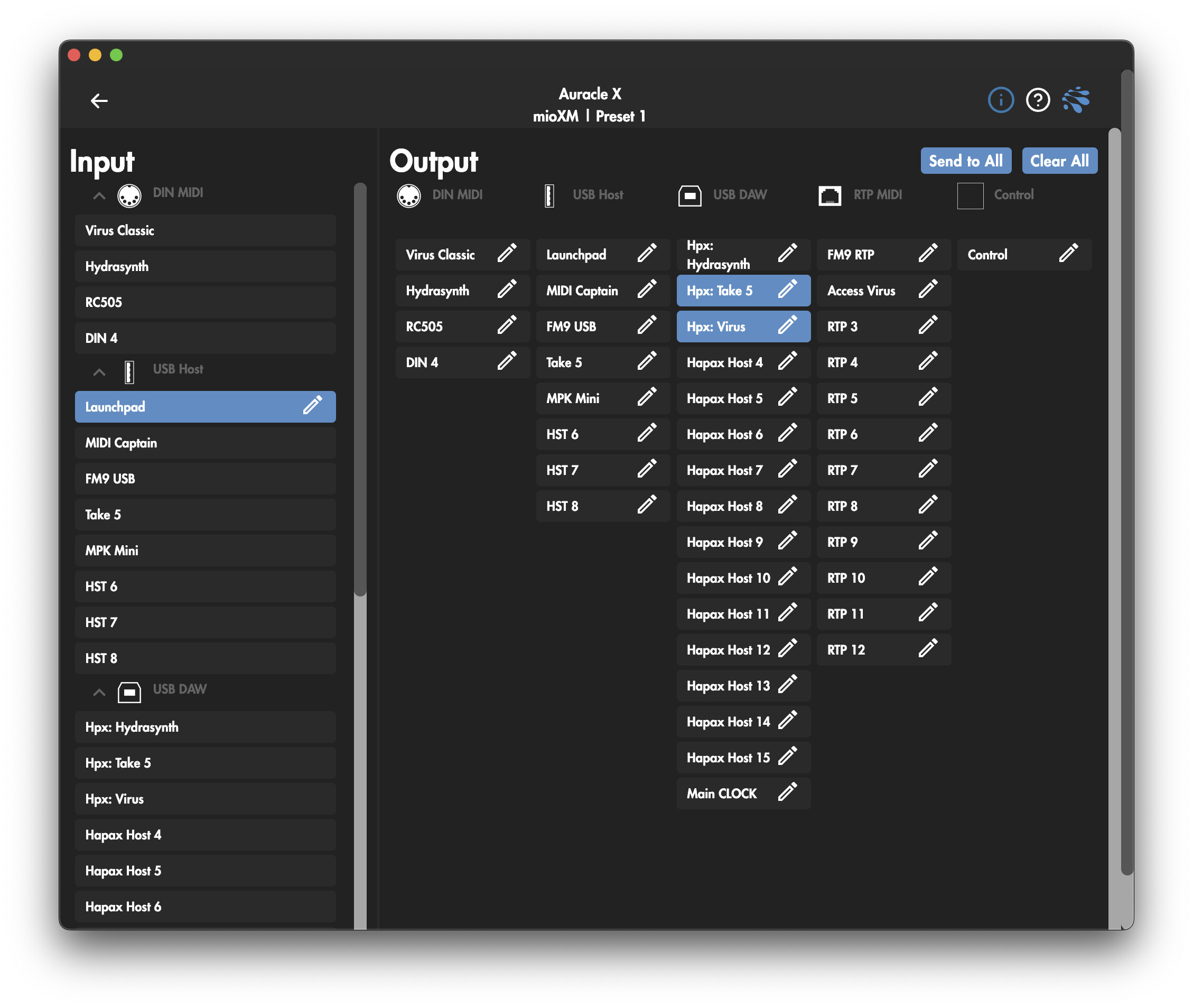
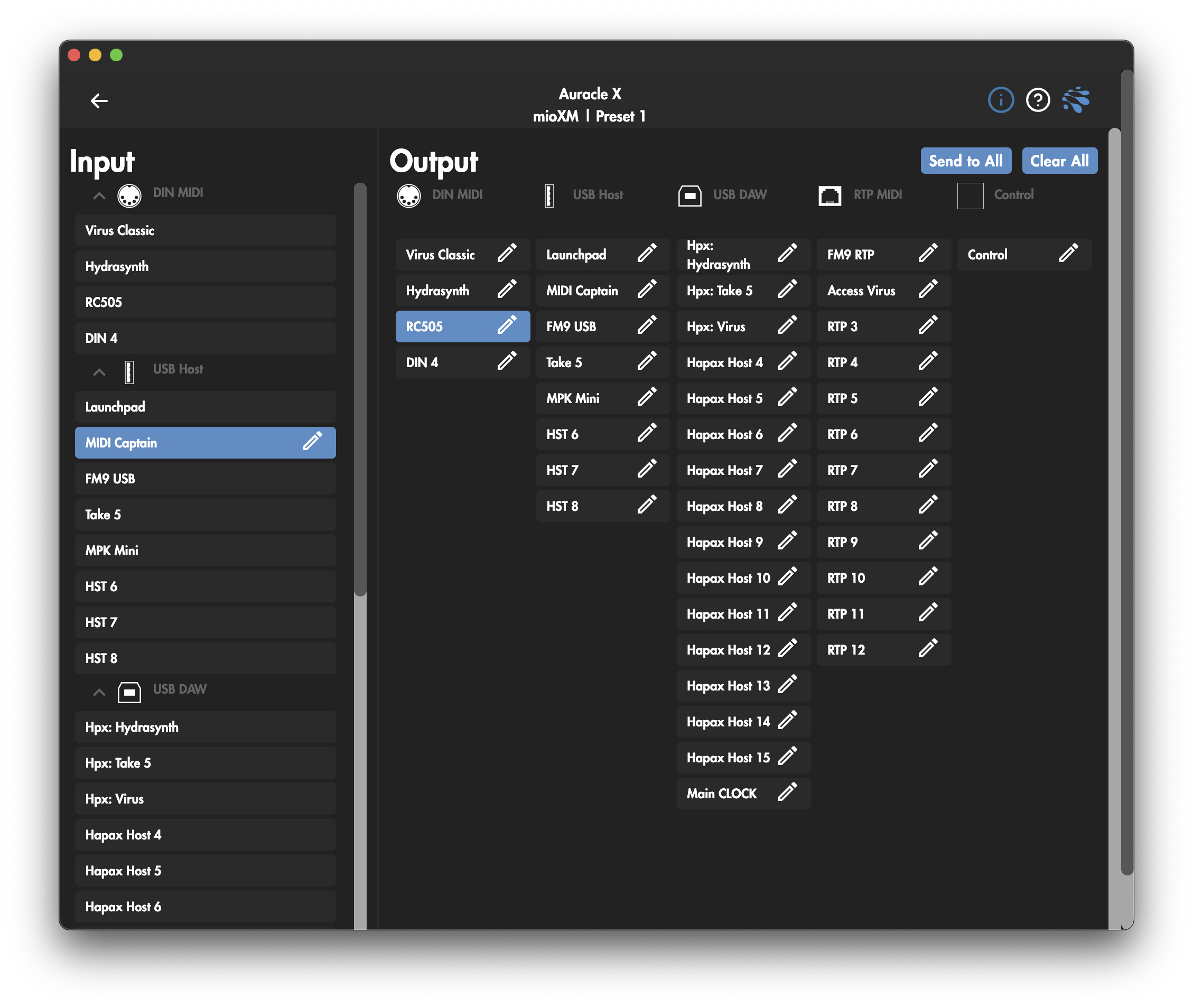
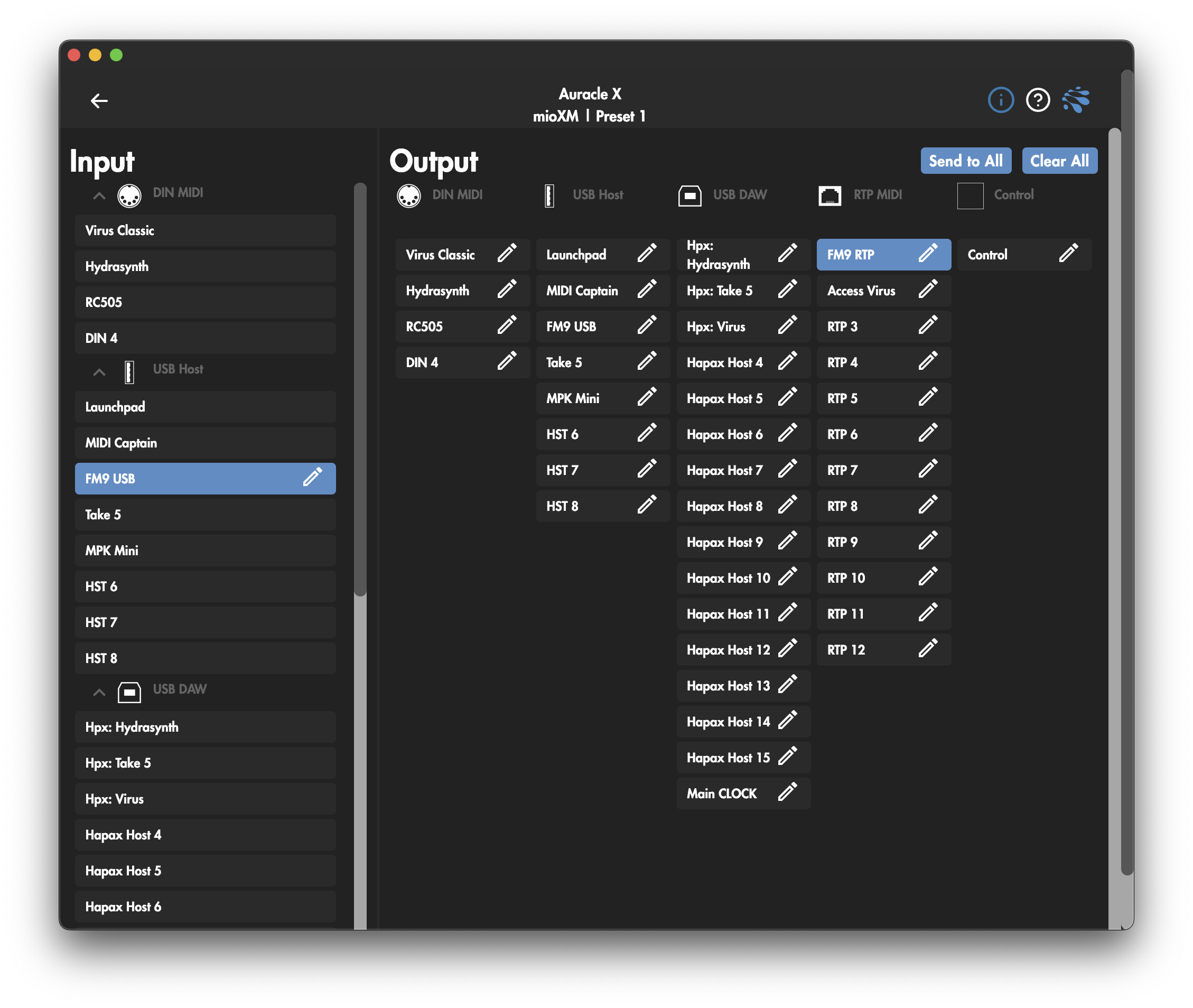
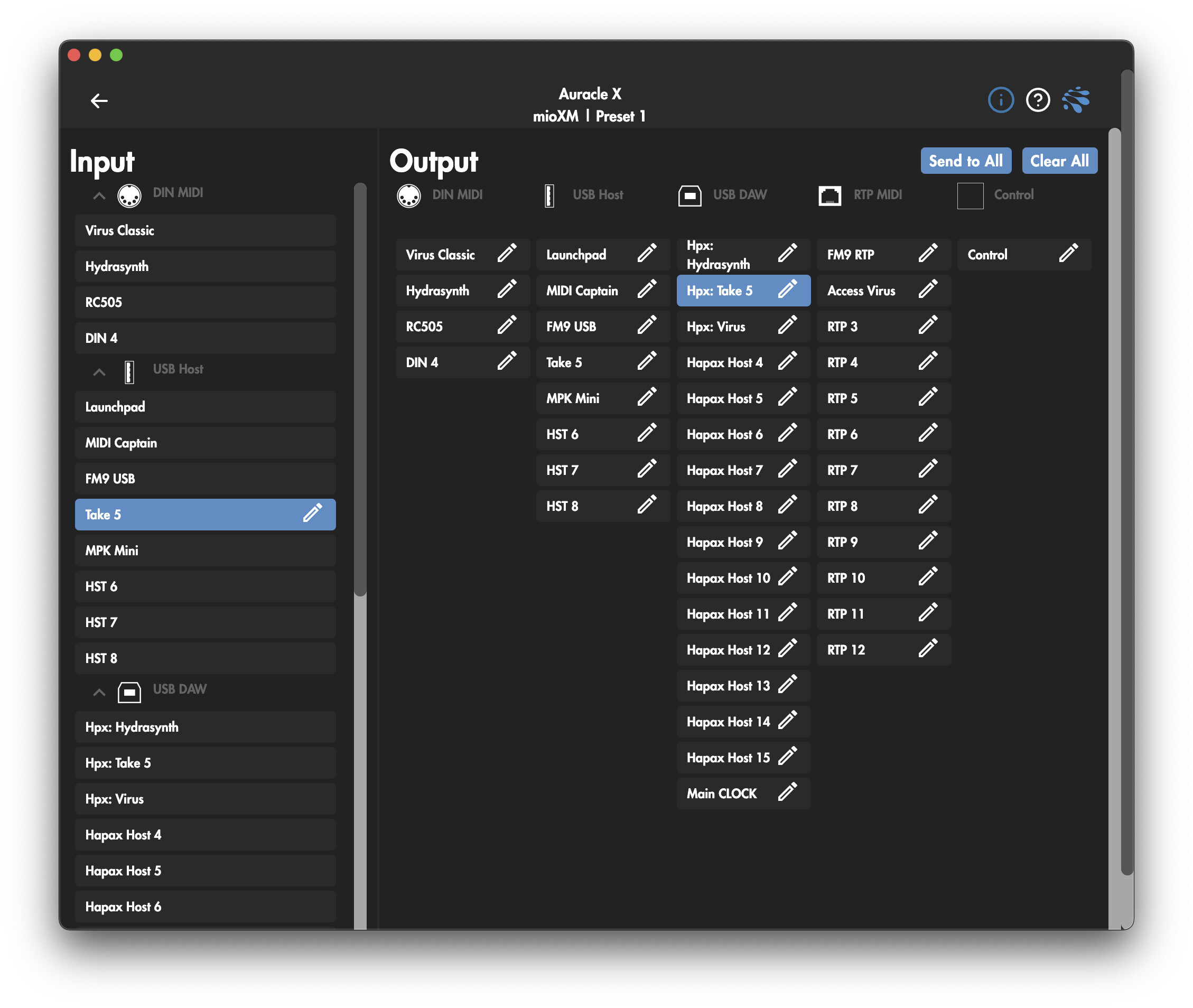
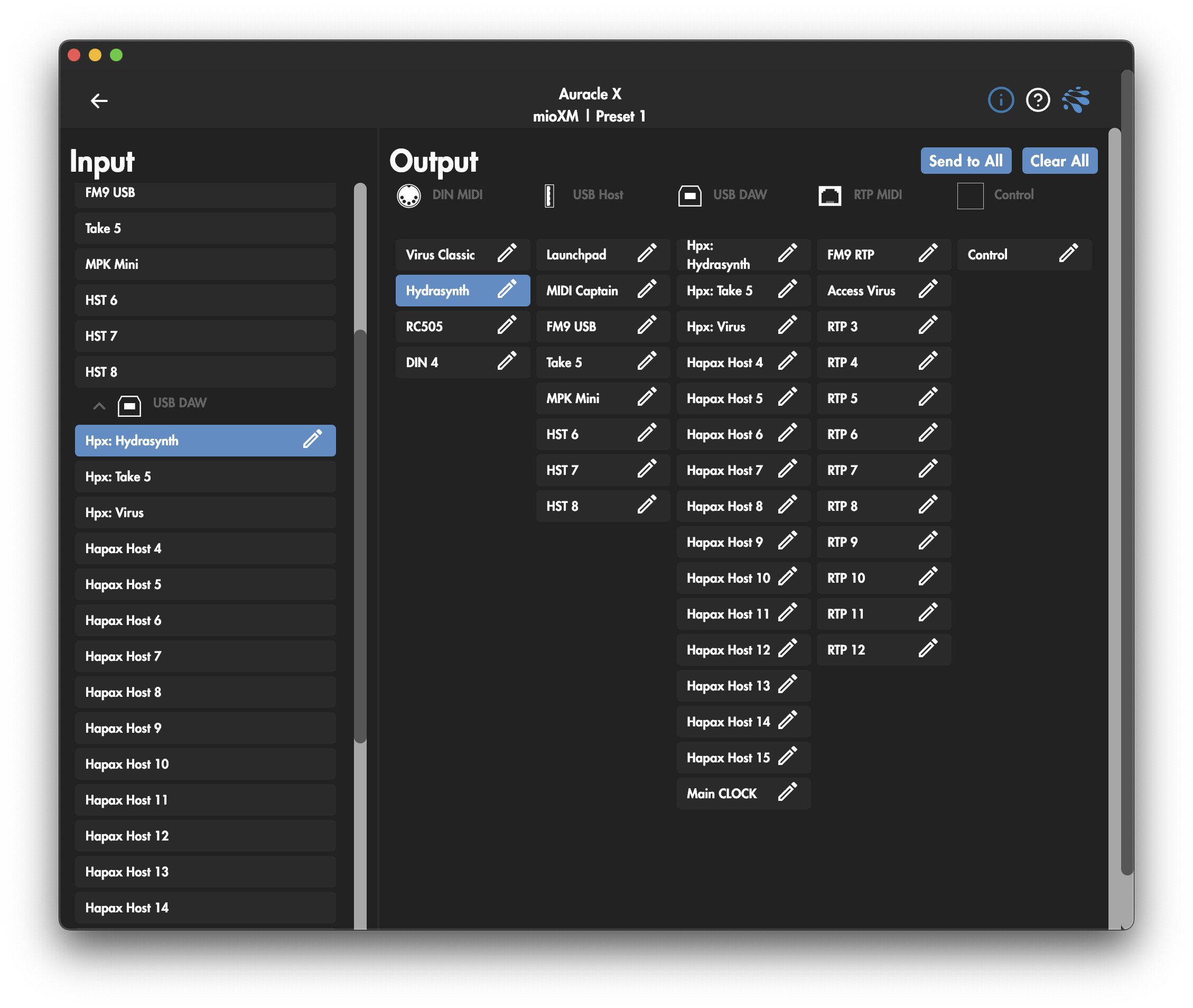
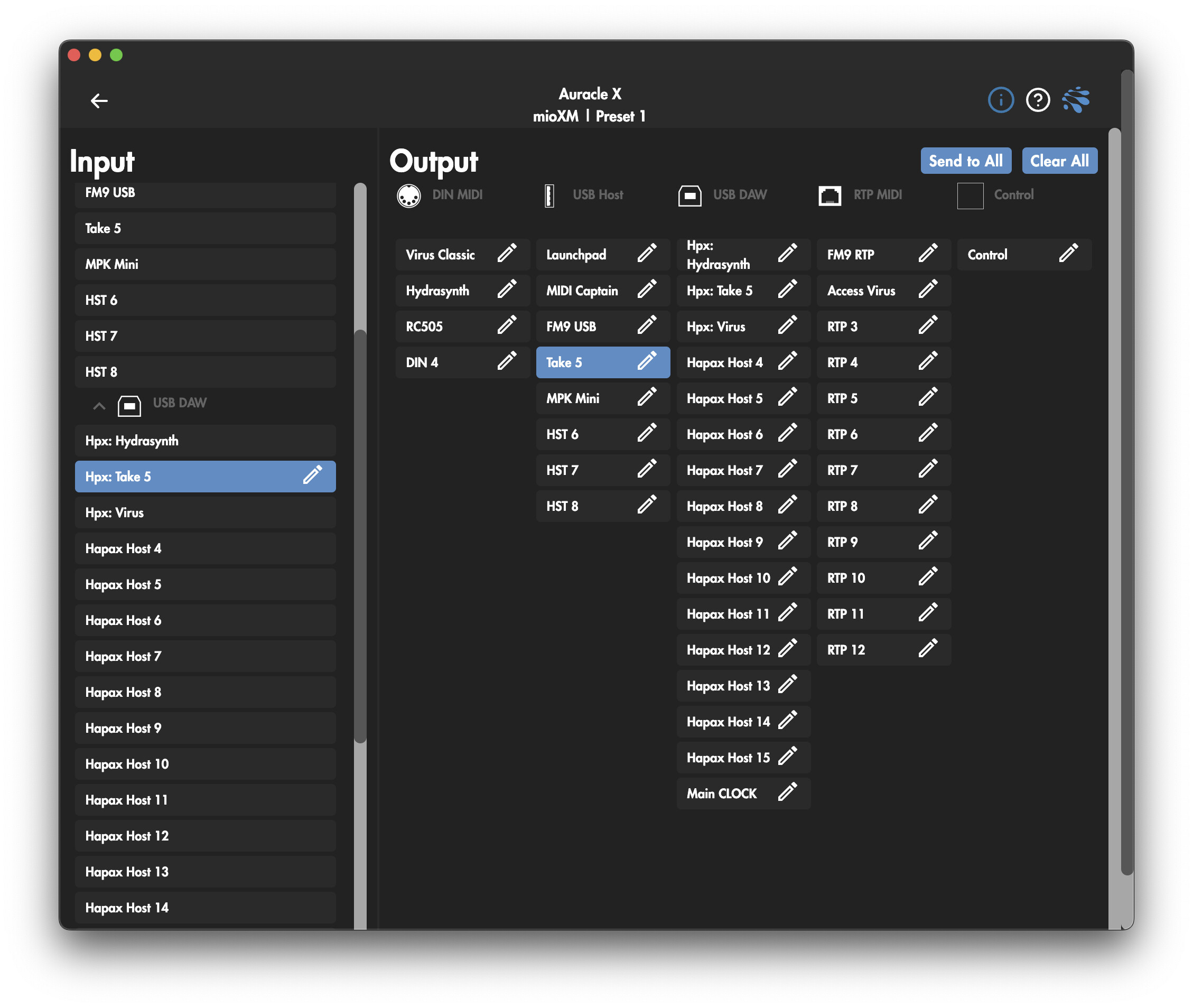
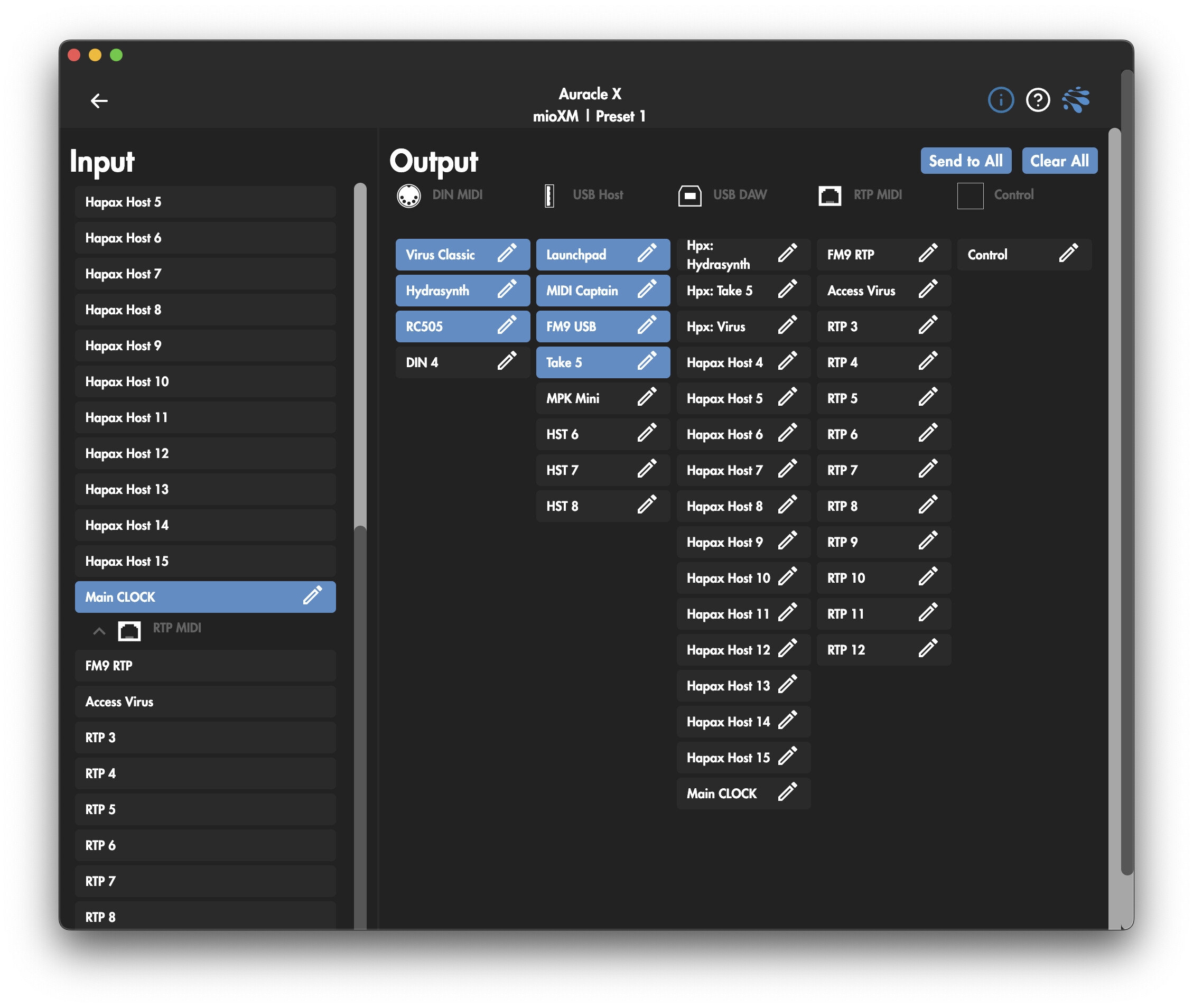
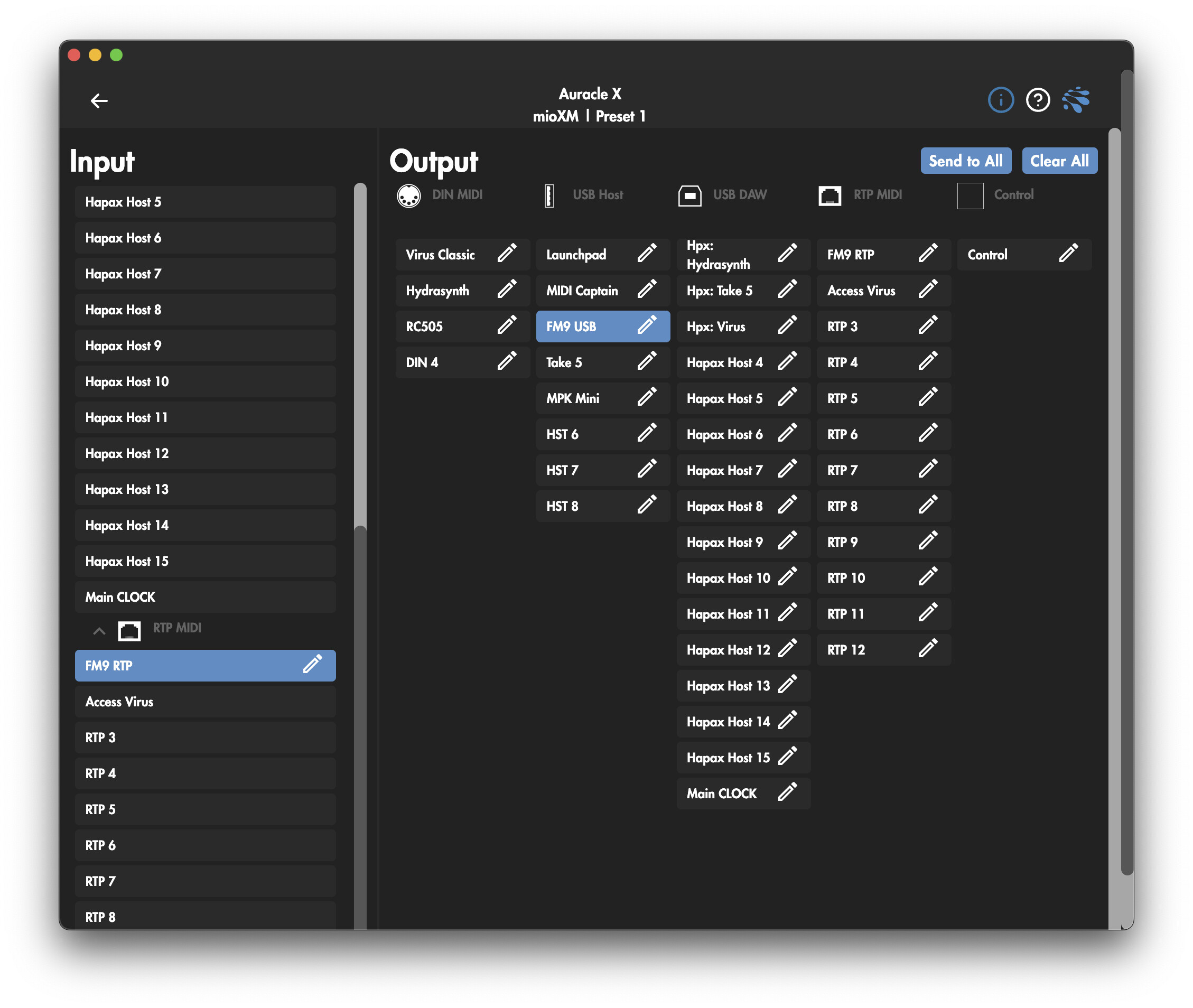
Just finished configuring my new iConnectivity mioXM, and dayum! This thing completely transforms the setup when paired with the Hapax.
Having the mioXM connected to the Hapax USB Host port is a massive game-changer because it instantly exposes all 16 virtual cables inside the mioXM’s matrix. But the absolute best part of this integration is how it solves clock jitter.
I set up Virtual Cable 16 to act exclusively as a dedicated “Sync Bus” (carrying only Clock and Transport messages). I can now route this clean clock cable to any synth or looper that needs it, completely isolating the timing pulse from the heavy data traffic of other channels. If you use MPE gear or send heavy CC automation, you know how easily that data storm can choke the clock. Now, my MPE data has its own isolated lane, and the clock arrives completely jitter-free to sensitive gear like my RC-505. It’s perfectly tight!
Here is how the whole ecosystem looks right now:
Connected directly to the mioXM:
Hydrasynth (DIN) - MPE data flows freely without messing with the clock!
Access Virus Classic (DIN)
Boss RC-505 (DIN) - Receiving that clean Clock/RT from Cable 16
Sequential Take 5 (USB)
1010music lemondrop (USB)
Fractal Audio FM9 (USB)
Launchpad X (USB)
MPK Mini mk3 (USB)
MIDI Captain (USB)
Connected directly to the Hapax:
mioXM (USB Host)
Erica Synths LXR-02 + DB-01 (DIN A - Daisy chained, receiving Clock/RT directly from Hapax)
RTP MIDI (Network/Wireless Magic): Because the mioXM handles network MIDI so beautifully, I also have a wireless iPad/Macbook workflow seamlessly integrated alongside the dawless hardware:
FM9 is exposed via RTP MIDI so I can manage my guitar scenes wirelessly with FracPad.
Virus Classic is also exposed via RTP MIDI to manage patches with the Aura Virus Editor/Librarian.
Everything runs simultaneously, perfectly quantized, and without a single computer in sight. Highly recommend this combo if you are hitting a wall with MIDI routing!
I was just reviewing yesterday the forum for any MioXL advise on how to connect it to Hapax so your setup comes along. Awesome and that it works for you. Could could possible share a screenshot of your routing in Auracle X?
Exactly! The mioXM is connected to the Hapax’s USB Host port. While it’s just one physical cable, it gives me 16 virtual MIDI cables (Hapax Host 1 to 16 under USB DAW). I then use the mioXM matrix to route each of those virtual cables to a specific physical output or device.
I have a mioXL for years and while I had all DIN ports in use at one point, they are now freeing up again as more and more gear is USB midi class compliant and with no noticeable increase in jitter. Only my Bass Station 2 has much tighter timing with DIN (I think it has USB 1.0).
I’m pretty sure the mioXM is able to add usb ports by connecting a regular usb hub.
Good point! I actually have a hub connected too. But just like your BS2, I found that my Hydrasynth is much happier on DIN. The MPE/PolyAT bandwidth over USB was causing some jitter issues.
My current setup is a keystep into Hapax usb in. Then i have a launchkontrol connected to macbook via usb that i just use for ableton. Its not connected to hapax. Hapax is also connected via usb to the daw. And then one midi cable goes from hapax to a thru 5 that splits the signal to 2 drum machines a synth and sampler. And another hapax din out goes to another synth.
if i got a mio could i consolidate everything to connecting to the mio via din or usb and just connect one usb cable from the hapax to the mio and have complete control, even of my daw?
its a little confusing to wrap my head around but the end goal would be to use hapax, with keystep or launchknobtrol going into it and being able to control any hardware or software in my studio.
That is exactly the rabbit hole I just finished going down, the answer is a resounding YES and it’s a total game-changer for the Hapax workflow.
You connect the mio’s USB-B (DAW) port to the Hapax USB Host port. Even though it’s just one physical cable, the Hapax will “see” 16 virtual MIDI cables (Hapax Host 1 to 16 under USB DAW input).
You plug your Keystep and LaunchControl and any synth with class compliant usb midi directly into the mio’s USB Host ports (or a powered hub connected to the mio). Inside the mio’s routing matrix (Auracle X software), you route those controllers to the Hapax virtual cables.
To integrate your DAW, and since we are already using the Mio’s USB DAW port you can use the RTP MIDI (Network MIDI) capabilities of the Mio interface. You simply connect the mio to your network via Ethernet. Then, in the routing matrix, you expose your synths, controllers, and even the Hapax virtual cables to any of the available RTP sessions. Your DAW will “see” these sessions over Wi-Fi or Ethernet as if they were direct USB connections.
Your Hapax stays at the center. It receives notes from your Keystep, sends CCs from your LaunchControl, and sequences your hardware and Ableton simultaneously, all through that single USB connection to the mio.
Thats awesome I appreciate all that, it makes a lot of sense. The only thing is I don’t want to use the network because I am in a large area and the wifi is not the best, plus Im not near an ethernet jack.
I wonder if I could use the Mio DAW port into the macbook and then wire in the controllers and hapax via Mio USB. The only other thing I should mention, is I clock with a Nome 2 sync clock. I doubt thats a big deal, but I send the clock from the Nome into the Hapax via MIDI DIN and it feeds everything. I have send sync option turned off in the DAW since the Nome is sending that out. I suspect I can probably keep that connected as is.
If I can consolidate the USB keystep and launch Kontrol/pad so they connect to the Mio via USB and feed into hapax, that would be pretty huge on it’s own. The hapax only has the one usb input so I can’t route launchkontrol or my little launchpad mini into it cleanly. Plus using MIDI thru5 is not bad, but having one MIDI router with everything flowing through it would be amazing.
You can absolutely go the wired route. In that case, the mio DAW port goes to your MacBook, and you connect the Hapax (Device port) to one of the mio USB Host ports.
To make the “one cable” magic work in this direction, you’ll need to use the USB Host Reservation feature in Auracle (I’m attaching a screenshot of how it looks).
On the mioXM, you can “reserve” up to 8 virtual MIDI ports (I think 16 slots are available in the XL) for a single USB device.
Even though there’s only one USB cable between them, the mioXM will “split” that connection into 8 independent ports. You can then route “Hapax Virtual Port 1” to your first synth, “Hapax Virtual Port 2” to the second, and so on.
Your Keystep and LaunchControl also plug into the mio USB Host ports (use a powered hub if you run out of ports). You just route them in the matrix to talk to the Hapax virtual ports.
This stays exactly as you have it. Since the Nome 2 is already feeding the Hapax via DIN, the Hapax will simply pass that clock through the mio to everything else.
 Connected directly to the mioXM:
 Connected directly to the Hapax:
 RTP MIDI (Network/Wireless Magic): Because the mioXM handles network MIDI so beautifully, I also have a wireless iPad/Macbook workflow seamlessly integrated alongside the dawless hardware: