Reliq-Instruments and Sim’n tonic teamed up to make life easier with proper clock between a DAW and a MIDI port or the Reliq. They call it U-SYNC. I think it would be a great addition for the HAPAX to be able to connect it via USB to the U-SYNC plug-in in a DAW.
Everything would be always on grid when recording audio.
Surely worth a look and the consideration. My gut feeling tells me that they even might be happy to have a third manufacturer join their party.
Well, maybe my suggestion did not came across the right way.
I am not encouraging buying anything additional, rather implementing it into the squarp hardware. So it would be a free feature with a firmware update. The U-SYNC software part is free and it looks like a reasonable solution, not having to route extra audio to an additional device. It can use a single USB cable, which you need anyway if you connect your HAPAX to your DAW.
This NOME was made by the Sim’n tonic guy. It was pure audio sync, and now they co-developed the USB version of it with reliq. I think they are all danish guys. I figure if it is given, it really would make sense to knock on their door and ask to join, so it could be implemented. I suspect there is not much processing power required to handle it and I assume it might be possible to add it to squarp stuff too. It would be really cool.
I have a question regarding the delay/latency calibration however.
The documentation says that to set the compensation delay, you need to send an audio recording to the VST3. In our case (HAPAX only sends MIDI), my understanding is that we have to go through an audio instrument.
Then, I assume the delay would depend on the instrument used, since each one may have its own latency. What happens then when using several tracks with different instruments (each with its own latency) in Live?
Is it needed to recalibrate, and if so, how? (I was under the impression that the delay calibration was done once and for all.)
@ calibration:
I did the setup like shown in the video from the link once in my DAW(reaper).
I use the nome to clock hapax and daw at the same time. the vst just makes sure the recording is stuck perfectly to the timeline grid of your daw.
also in dawless use-cases nome2 is a much steadier clock than any of the devices i have. f.e. when i set nome2 to 120bpm to clock my hapax and i check in ‘bpm’ i get exactly 120 and it sticks there; no drift. i can change bpm on the nome2 and the hapax follows exactly. if i try clock hapax with any other device (deluge, bluebox,daw) there is always drift also if i use hapax as a clock for other midi gear.
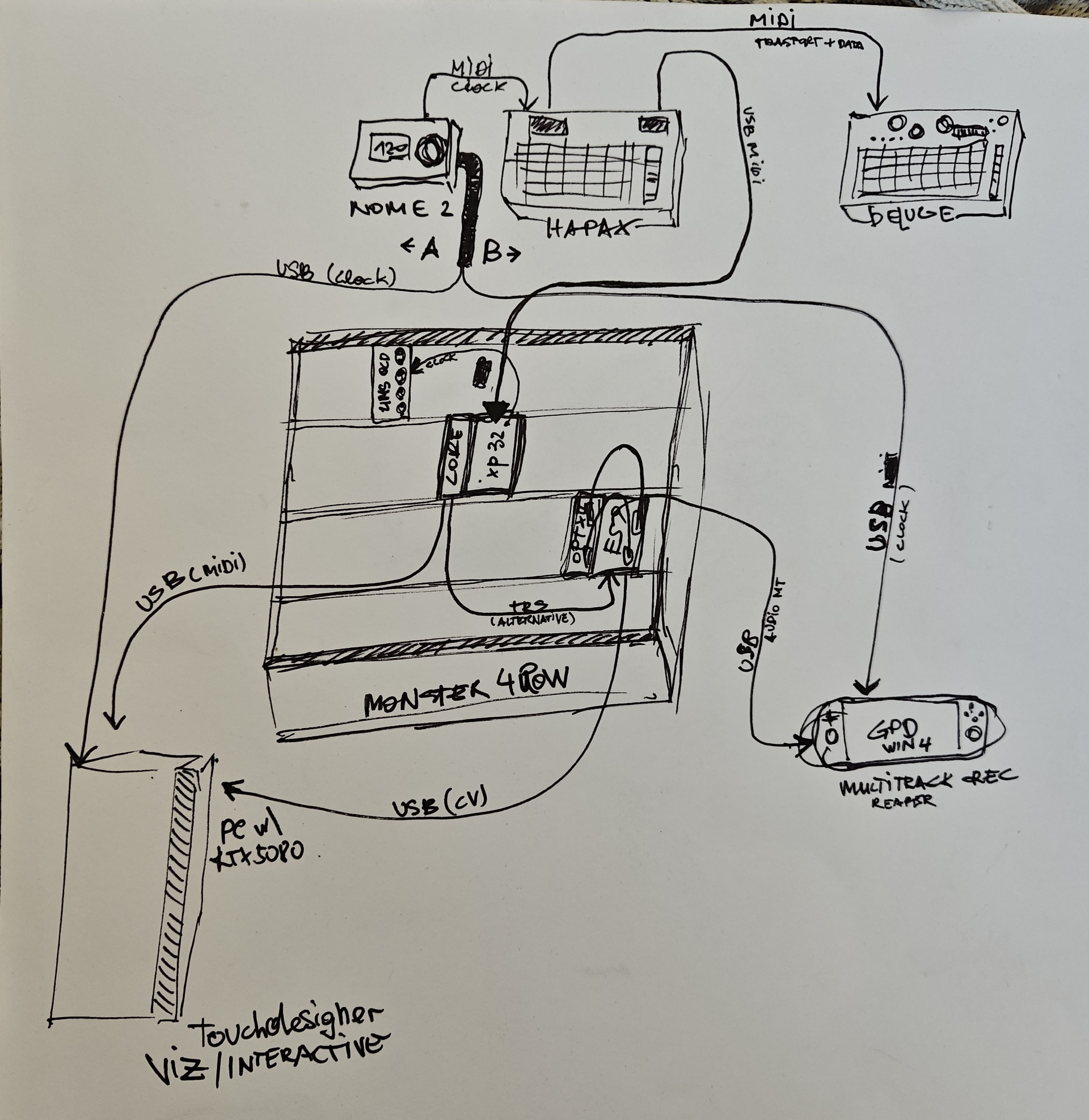
here is how i have it wired up.
i use 2 setups: A is my touchdesigner setup w/ a pc
B is my multitrack setup w/ a handheld running reaper.
You have a sample accurate CV input on the Hapax, All you need to do is send it the correct pulse and your sequencer and whatever is plugged in to it will be bang on. I use Ableton’s CV clock tool but if you dont use that you can find something to generate a signal.
Yeah so even if they dont have Ableton they can use your plugin
The CV clock input was probably the No1 feature that swayed me to buy the Hapax
I think the poster and other users may not understand the CV clock input and outputs are super tight and stable and way better than midi clock sent from a Daw.
The side effect is that if i restart the transport form the HAPAX, it is using with the wrong tempo for a short while until the clock is catched, and then the recording is not aligned to the grid.
As rvO has stated this is a known thing but doesn’t affect the actual tempo
You have a sample accurate sync feature built in. It would be a bit silly to go and buy a USB hardware/software product to achieve what your Hapax can already do