Can I output or “bounce” a midi effect chain result on a midi pattern?
Or can I enable / disable midi effects automaticaly on each pattern.
(one pattern have midi effect enabled and an other pattern on the same track have the midi effects disabled?
Can I output or “bounce” a midi effect chain result on a midi pattern?
Or can I enable / disable midi effects automaticaly on each pattern.
(one pattern have midi effect enabled and an other pattern on the same track have the midi effects disabled?
Pyramid had the “consolidate” feature which worked similarly to your description but I don’t think a comparable feature has been added to Hapax (yet):
On any track, you can “consolidate” the effects, in order to write down the notes + CC messages computed. When you consolidate a track, it will consolidate all its patterns. After the consolidate, all the effects will be removed.
You can even consolidate an euclidean track, in order to get the euclid pattern inside the classic stepmode NOTE.
To consolidate a track, click CONS:
!(data:image/svg+xml;charset=utf-8,%3Csvg%20height=‘128’%20width=‘256’%20xmlns=‘http://www.w3.org/2000/svg’%20version='1.1’%3E%3C/svg%3E)
[image]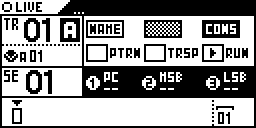
Then select the destination track with the menu encoder (can be the current track, or an empty track):
!(data:image/svg+xml;charset=utf-8,%3Csvg%20height=‘128’%20width=‘256’%20xmlns=‘http://www.w3.org/2000/svg’%20version='1.1’%3E%3C/svg%3E)
[image]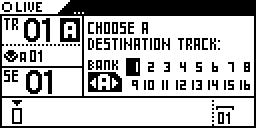
If you select the current track, this track will be definitely deleted and renewed with its consolidate version.
I’ll send it as a feature request, since I think it would a nice edition.
I strongly agree Hapax should have the “consolidate” feature from Pyramid. But to answer OPs original question, I think this answers what you are trying to do:
From the manual: Eefffects → Advanced Operations → “Hold 2ND and Press “TOGGLE ON/OFF” to lock the effect mute/unmute on the selected pattern: “ON*” (or “OFF*” if the effect is muted) will appears on the top of the context menu when it’s locked.”
Furthermore and likewise, Automation lanes can be muted per Pattern. Per the manual: Automation Mode → Muting an automation lane → "Simply scroll to the desired automation in the list, and press mute to mute this automation lane.
Note Mutes are per-pattern based.
Tip When a lane is muted in the current pattern, the lane shows an “M” status icon."
Use a MIDI out to MIDI in
Hey folks,
I wanted to share with you the response I received from Squarp regarding my feature request for a Consolidate Feature similar to what can be found in Pyramid. Here’s what they said: “it’s a good idea and yes we did it in the Pyramid. This one is a tough one and not as urgent as chord mode for instance but be sure we have it in mind (and in our tickets).”
So the Hapx team is aware… maybe we see this in the future.
Michael
Just wanted to bump this to see if there’s any hope for a ‘print MIDI’ type feature in an upcoming update. I’ve sent it as a feature request probably 2 years ago now and still think it would be such an important and useful tool!
The Hapax has so many excellent ways of randomly generating patterns, for example I love to use the ‘random’ effect on my TT-303 basebot v2, it can create such lively changes to the pattern by adjusting the length/velocity/octave - but its alway so frustrating to hear the perfect bar disappear while it constantly changes.
I was a big fan of the Toraiz Squid for its ‘timewarp’ feature - where it was constantly recording in the background the new patterns it generated, so you could go back and find ‘that perfect loop’ without the stress of having to be recording, and allowing yourself to just jam till you discover something you like.
If a ‘print MIDI’ feature like this is not possible for the Hapax (would be interested to see what the Pyramids consolidate feature looked like) as an alternative could they implement a feature similar to ‘Algo’, which creates a one-time random event that stays they same until you initiate another command to create a new random pattern/effect. Perhaps in each effect, for example ‘random’, they could have a one-time push feature (maybe you could set the desired bar length) which would just generate the random effect data as it’s own pattern, it could take up it’s own effect slot if needs be.
youll need another sequencer or a daw to capture fx in place but im happy to report that it works great! i do this in reaper and mpc
That’s good to know, but it’s a shame to have to incorporate other sequencers/DAWs when Hapax should be the only sequencer you need (I know everyone has different need cases, but generally speaking) it also would be a pain to have to then bounce that MIDI data back in, disturbing creative flow and costing time etc.
when i do that, i use them from my mpc, which also is my song sequencer. or reaper. but i hear you. its still my favorite sequencer of all time. elektron is definitely up there somewhere, and maybe oxi one but something about hapax just gets me there with style and grace. this occupation is full of workarounds! if youre not willing to work around, you dont get where others do. but its totally your choice! i get it. squarp needs to hear what youre saying but then the ball is in their court.
i do like the idea. it might be worth filling out the request form. it reminds me of the virtual midi bus for internal loop back idea that i think is a great one too.
I have never tried this but seems like a nifty tool to have on hand for such things.
another thing that might get in the way is the 32 measure limit the hapax has. mpc otoh has no length limitations to sequences. so if youre capturing evolving stuff maybe another sequencer is the best choice?
imo every random effect should have some kind of seed parameter that you can lock when you’re happy with the result and want to keep it consistent.