Locking effect parameters to patterns
Effect parameter values are per-track by default, but it is possible to lock some values to the current pattern.
This way, each pattern can hold different parameter values for the same effect.
While an effect is selected and the left screen is displaying the effect parameters, Hold 2ND and Press the associated encoder to toggle the param locking.
Below you can see an arpeggiator effect with 2 parameters locked: Octave and Repeat.
!(data:image/svg+xml;charset=utf-8,%3Csvg%20height=‘512’%20width=‘1024’%20xmlns=‘http://www.w3.org/2000/svg’%20version='1.1’%3E%3C/svg%3E)
[image]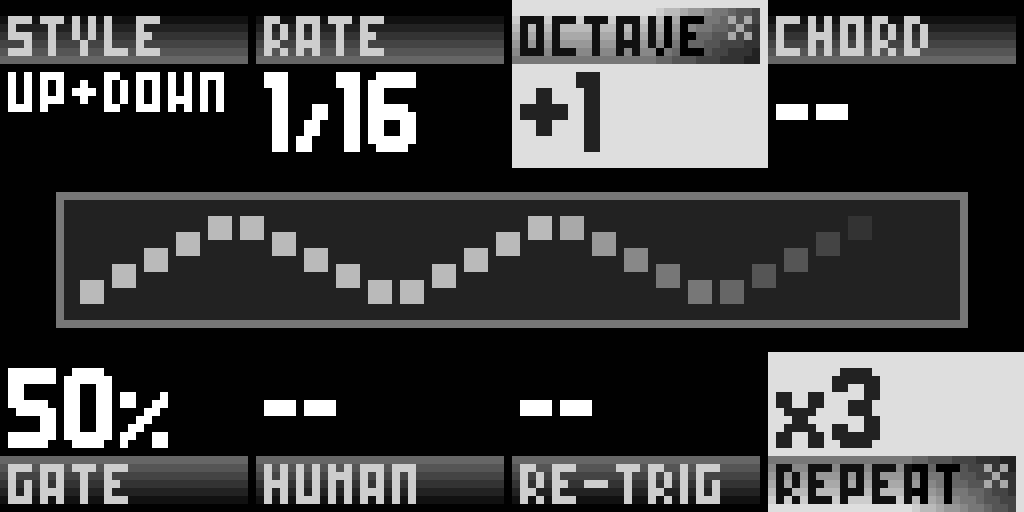
Tip In the context menu of an effect, Hold 2ND and Press TOGGLE ON/OFF to lock the effect mute/unmute on the selected pattern.
ON* (or OFF* if the effect is muted) will appear on the top of the context menu, indicating that this value is locked on this pattern