Hello,
 I’m seriously considering buying the HAPAX, as it looks like an amazing machine for live performance.
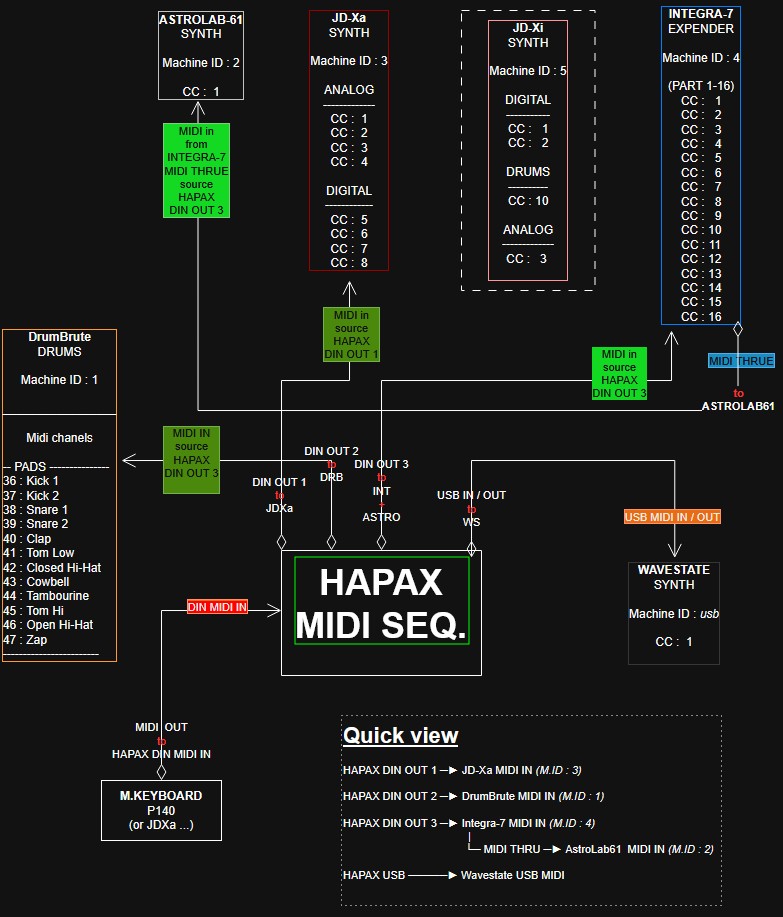
 That said, I’m still fairly new to advanced MIDI routing on the hardware side, and I’m trying to figure out a setup that would let me control all of my MIDI gear:
 From what I understand, I have a few constraints:
-
I only have one MIDI THRU port (on the Integra-7).
-
The Integra-7 has 16 Parts (16 sounds), corresponding to MIDI channels 1–16.
-
The JD-XA has 4 Analog Parts (MIDI channels 1–4) and 4 Digital Parts (MIDI channels 5–8).
-
The JD-Xi has 2 Analog Parts (MIDI channels 1–2), 1 Drum Part (channel 10), and 1 Digital Part (channel 3).
 To be honest, I’m starting to get a bit lost, as I don’t yet have enough experience with MIDI routing on the HAPAX.
 My goal is to optimize:
-
the MIDI ports (where the messages travel),
-
the MIDI channels (which instrument or part receives the messages),
-
and the CC messages (which parameters are being controlled).
 Does anyone have any advice on how you would approach this setup?
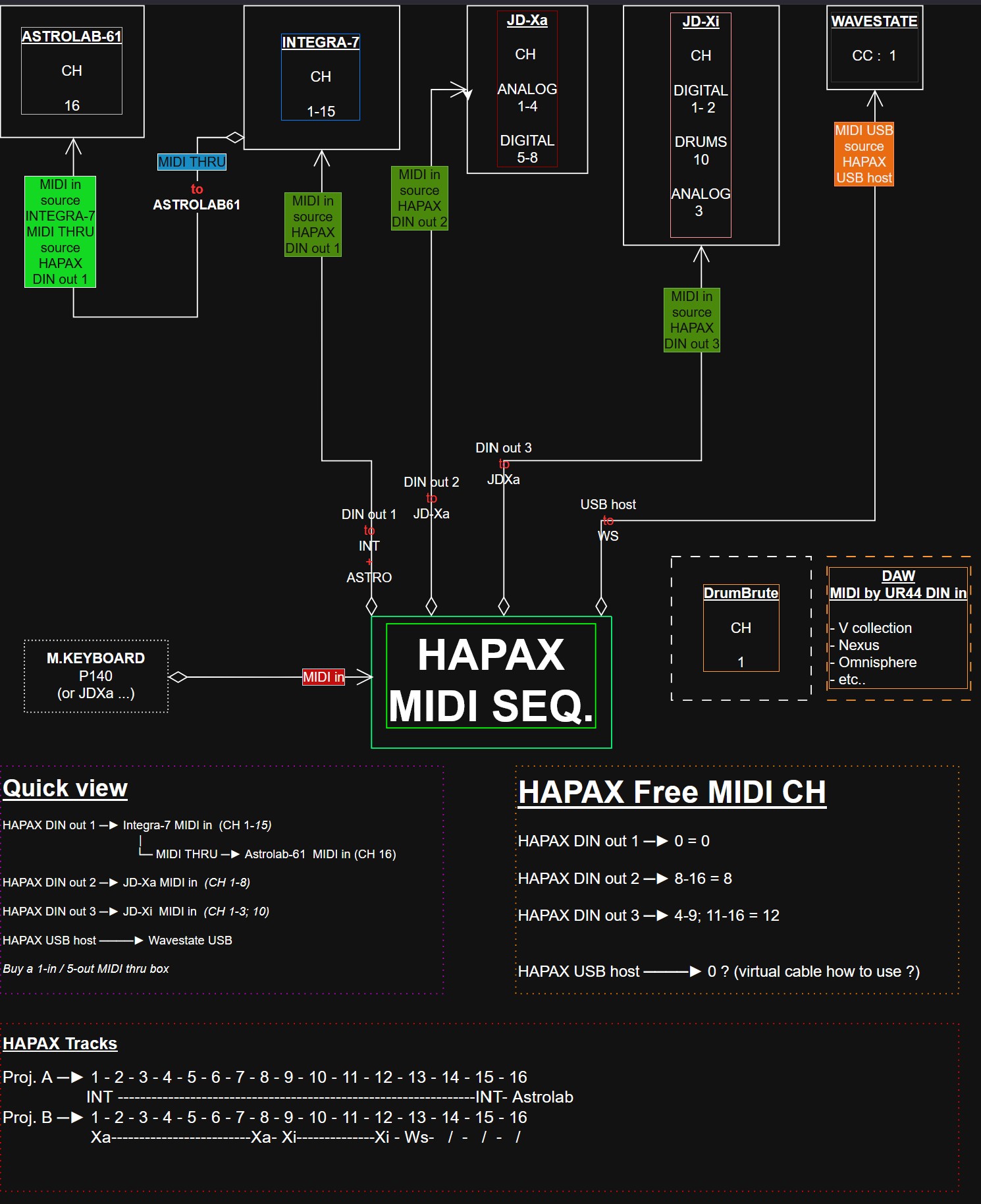
 I’ve put together a first wiring diagram to help me understand what should be connected where:
Thank you so much.
1 Like
In the diagram you have CC 1-16. I’m guessing you mean Channel? CC means Control Change in MIDI parlance.
Seems like you know this already, but if you send MIDI messages on a channel over a DIN cable and use MIDI THRU to send it on to another device, that device will receive the same messages. So triggering notes on the Integra on Channel 1 and sending Channel 1 along via THRU to the Astrolab will result in hearing sounds from both.
But take a look at the new Virtual Cables feature in the latest release. Basically you can connect Hapax to a device with one USB cable but there are 4 Virtual Cables, each carrying its own set of MIDI channels 1-16. That might help with connecting some of the modern devices.
Alternatively, you can just not use Ch 1 on Integra. Even “just” 15 channels is a LOT.
1 Like
I dont know if Im missing something from what you;re asking but you easily have enough ports for your setup
You could dedicate one of the Hapax midi outs to the synth you likely use for the most sounds which appears to be the Integra. You could also dedicate a port each to your JDXa and JDXi and leave the last one (4th) port for the midi thru/in routine for whatever synths and drum machines you have left. Im my case i have four boxes which can only play one sound at a time so they dont get a dedicated port. They share one and are connected via midi thru/in. No problem at all.
Using the midi thru on you gear to connect to the midi in of other gear is totally fine. The midi thru - in thru - in routine is a long used system,
Then you have the USB port you can use to send midi to your pc/mac in the event you use any VST synths.. And as Guyaguy says there the USB connection which is basically 4X16 virtual midi ports all coming from the Hapax. So, if your gear has USb ports there’s another means of connecting.
Yeah there are connections and solutions flying about over the place 
The Hapax can deal with your system in its sleep. 
1 Like
Thank you very much for your reply and advice!
 I’m reassured to know that I’ll be able to use all my gear.
 I’m going to review my setup (and fix the CC inconsistencies) to better understand what’s possible.
The Hapax really seems incredible.
1 Like
Its very powerful but it requires time and patience to get used to using it if you come from a linear (Daw) background which is where Ive always been. I haven’t ditched the Daw, just wanted to get away from using it all the time for everything.
2 Likes
 The Hapax is on its way!
 I ordered it last Friday, and it should arrive sometime this week.
I’ll be sharing my thoughts very soon, along with my first impressions and an overview of how I’ve connected all of my gear.
 And maybe even the result of my first jam!

4 Likes
Hi, in the meantime I’m trying to make progress on my setup and figure out how it all works (though I’m not exactly a complete beginner).
But I think there are still a few things that could be improved. Consider adding a MIDI THRU box to expand the setup and make use of the remaining available MIDI channels in Project B may be.
Idk why it linked so big, but this is 16 midi through channels, i have 3 of them on midi out A B C from hapax.
You can set the midi out’s for A B C and D to 1-16. plus the CV and GATE outs for modular, you’ll never run out of ports if you snag these. this 16 port one was one of the cheapest out there, but solid metal construction. midi gets insane! so much funnn
2 Likes
If you want a cheaper solution, for port D (the TRS midi port), I just use a passive stereo splitter into my euro racks, I split it 4 times with no apparent degradation!
2 Likes
Or for convenience, get Midi Solutions Quadra Thrus (they run on power from the midi cable).
1 Like
Here I am again with some good news! And please forgive me for the late reply.
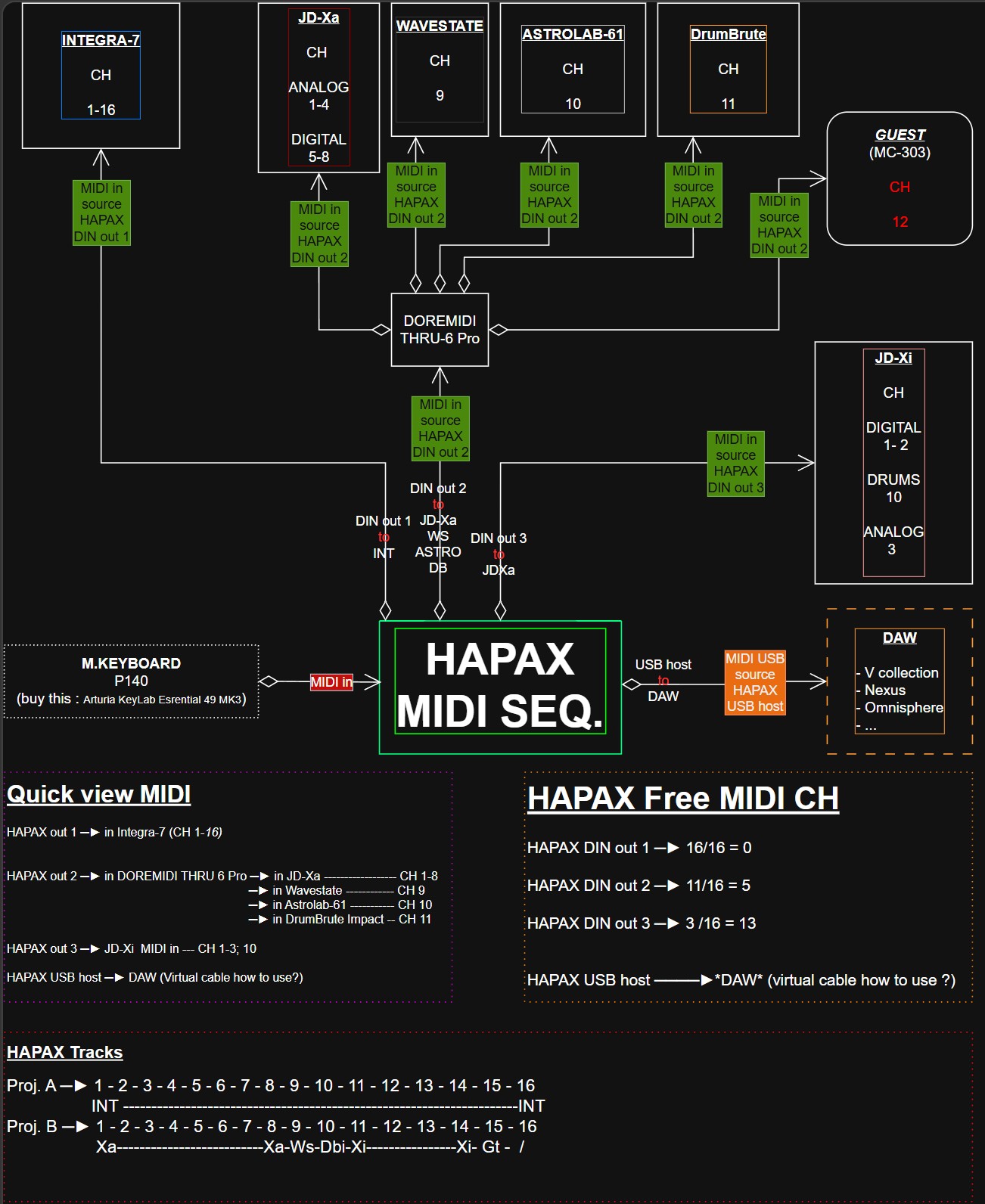
I’ve finally received the HAPAX and I’m starting to get familiar with it and understand its workflow. I also found the Trhubox “MIDI THRU-6 Pro & Filter”, which seems affordable and well suited to my needs (or at least, I think so  ).
).
The package also included a “Jack (CV) to DIN” adapter. And, as it turns out, I also have two more from the MPC Touch that I had on hand. I imagine they could be useful, if needed, to connect other hardware via DIN.
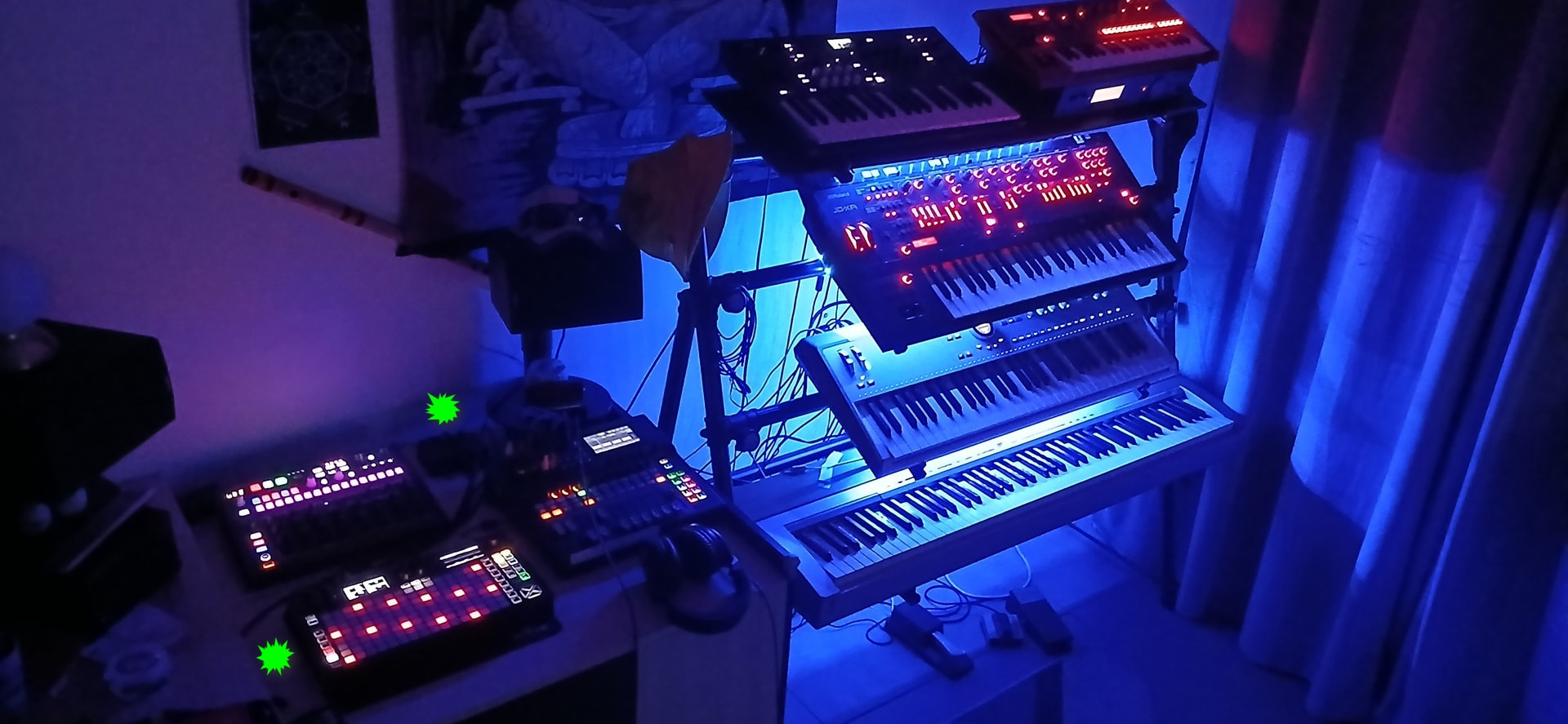
To get started, I’ve put together this setup, which will probably evolve quite quickly as I learn more:
Diagram
Setup
Once I’m a little more comfortable with the HAPAX, I’m hoping to eventually produce something that sounds more or less like an actual composition! 
By the way, I have to admit I haven’t read the forum’s “KLUF” yet… but I’m appealing to common sense here. Is it okay to post an external URL to a social network here, such as YouTube or something similar? If someone could confirm whether this is allowed, that would be great.
I’d really love to be able to share my jams here and get your feedback and/or advice to help me improve. I’m sure everyone here is passionate about this stuff, and it’s really great to be able to exchange ideas with people who share the same passion.
Thanks in advance for your feedback!
you can post videos, i do. i drop an instagram link here and there but my links are also in my profile. theres not many haters here, and as long as what youre trying to illustrate is relevant i dont think people will mind. just dont spam i guess. start a thread where you post your own stuff rather than putting it everywhere.
1 Like