💿 hapaxOS 3.00 released

Hey everyone,

We’re excited to announce that hapaxOS 3.00 is now available :rocket:

This major update introduces powerful new features, including MPE support and Virtual Cables, along with a range of bug fixes and performance improvements.

To fully support the complexity and data demands of MPE, we’ve deeply reworked the system architecture. This is why we’ve moved to version 3.00: it marks a significant milestone for Hapax. The result is a more robust and reliable experience than ever before, including when working with classic Poly tracks.

– See the change log and download it now: https://squarp.net/hapax/firmware/
– New MPE section in the manual: https://squarp.net/hapax/manual/modempe/
– Release video showing the MPE features: https://www.youtube.com/watch?v=4OK3F1vOqqs

A big thank you to all our beta testers who helped us refine this release over the past two months.

Have fun exploring!

37 Likes

Just received MIOXL !

Thanks !

1 Like

thank you!

1 Like

Amazing! Thank you!

That’s just a glorious day in the sequencers world.

Good job guys.

1 Like

Thank you guys, it is awesome to now have virtual cables !

Thank you soooooo much for increasing the projA/B mute sync time - probably my most wanted performance feature :smiling_face_with_three_hearts: :smiling_face_with_three_hearts: :smiling_face_with_three_hearts:

1 Like

That YouTube opening… :rofl: “We’ve noticed that the current firmware of Osmose has issues” :100:

Thank you @squarpadmin for the high quality development work, as always :folded_hands:

Grrreaaat!!

:heart::ok_hand:

I think the update broke default CC values in instrument definitions.
It seems to no longer load the default for CCs listed in [AUTOMATION] that populate automatically when you load the instrument.
It works when I delete the lane and load the same CC by hand tho. Also works after downgrading back to 2.21.

Thanks to the team :star_struck:

If I may…, if you please look into POLY AT for the next update, MPE controller are VERY expensive and I have a Launchpad Pro MK3 ready to go :sweat_smile:

Again , good job with the update it’s awesome :smiling_face_with_three_hearts:

Best Regards

3 Likes

Has anyone tried connecting Hapax w/ 3.0 to a USB midi interface (mioXL, M8U eX etc) to expose the virtual cables/ports on DIN ports? Is this possible?

I’d like to get Hapax and have it be the central MIDI router as well as sequencer. The new virtual USB midi ports would seem to be a perfect solution to connecting multiple MPE-capable synths and then be able to select which one to control within each track setting. Just not sure how I would go about connecting multiple synths to multiple virtual ports on one USB connection at the Hapax (if it is even possible).

Cheers for any advice

Each virtual ports is its own MIDI cable, so it can host 16 MIDI channel, so each virtual port can be used by at least one MPE controller (input) and one MPE synth (output). I say “at least” since you can always reduce the number of member channels, and for example having 1–8 to synth 1 and 9..16 to synth 2, given it will have a potential effect on the available polyphony.

That said, to use the output virtual port, you either need a synth that understands virtual ports itself at its USB MIDI input, or, like I do currently, use a MIDI HUB that does that for you.

I can only talk about the MRCC because this is what I have for that, but I know the mioXL is a great Hub.
So on the MRCC you have 4 USB Host ports. Each can host 4 virtual ports (1 to 4). So I plug my Hapax from its USB device port to one of the MRCC USB ports. It means I will have 4 virtual ports exposed and available to the MRCC on each USB ports (Ports 1 to 4). On the Hapax, I set 1 track to use MIDI Output USB Device 1, another one MIDI Output USB Device 2, and so fort up to 4.

ON the MRCC I route each port to a distinct MIDI Output Destination, usually running a simple MIDI DIN channel.

On the controller side, there can be different strategies. Mine is to plug an MPE Controller from its USB device output port to another free USB host port on the MRCC. Typically, I use up to three MPE controller (one ERAE2 and 2 ROLI keyboard). Each is routed to the same USB Host port I talked above (the one the Hapax is connected to), back to the Hapax (since USB is bidirectional).

ON the Hapax, on each track, I select from which port I want to listen, i.e., which controller, to play the synth on this track.

This allows me either to play directly a MPE synth live, and/or record the notes on the Hapax.

Note: I didn’t fully tested everything yet in this setup, it’s a work in progress. But theoretically, and potential bugs apart, it should work and is pretty flexible. It’s easy to change settings on the Hapax. And on the MRCC you can recall various setup easily. I’m also super interested to hear about others setup and strategies.

2 Likes

Thanks Jess

Exactly as you say I want to connect each of the virtual ports to an individual synth. For my needs 16 ports is more than I need right now but leaves room for expansion. Essentially need to identify a way to expose or breakout the virtual ports to physical connections.

I don’t think there are any synths that if connected via MIDI-over-USB are aware of virtual ports or have the facility to select amongst different ports. At least, all the synths I have solely provide the option of channel selection. Plus I’d like to keep USB connections on the synths available for updates, editor software etc.

Ideally for my use there would be a basic midi usb interface/box with 16 DIN ports that can route each of the 16 virtual ports to a physical DIN port. Effectively just a simple ‘splitter’.

I had looked at the MRCC but its not cheap and really overkill for what I need. It also seems from your post that MRCC only recognises four of the 16 virtual ports coming from Hapax? I don’t need complex routing or filtering; if I can connect virtual ports to individual synths then I can do all the routing I need in Hapax.

mioXL seems a good option but I can’t tell if it will be able to ‘see’ the virtual ports from Hapax when connected to the device or host port, or will just allow routing of one port as before.

1 Like

Yep, I understand. A simple device that would only do 1 USB → 16 DIN would be great in your scenario. Not sure it exists yet, though, I don’t know.

Indeed an MRCC might be overkill in your use case. I bought mine years ago, I guess the price has gone up with inflation and stuff. Also it’s a small company.

Pricey but It starts to pay off when you eventually accumulate gears over the years and want them to be connected altogether once and for all without enduring the pain to reconnect everything every time you want to control synth A with Controller B one day and another combination the next day.

Anyways. I think we’re still at the beginning of the MPE era, not even talking about MIDI 2.0 specifications. The ecosystem is growing slowly, we might see more middleware devices, like the splitter you’d like, coming our way to solve these situations. Hopefully.

Hope others will suggests more ideas :slight_smile:

If you don’t use it for a computer, you can also connect the Hapax (host usb) to the MRCC device port … 12 virtual ports.

1 Like

Absolutely! :ok_hand:

1 Like

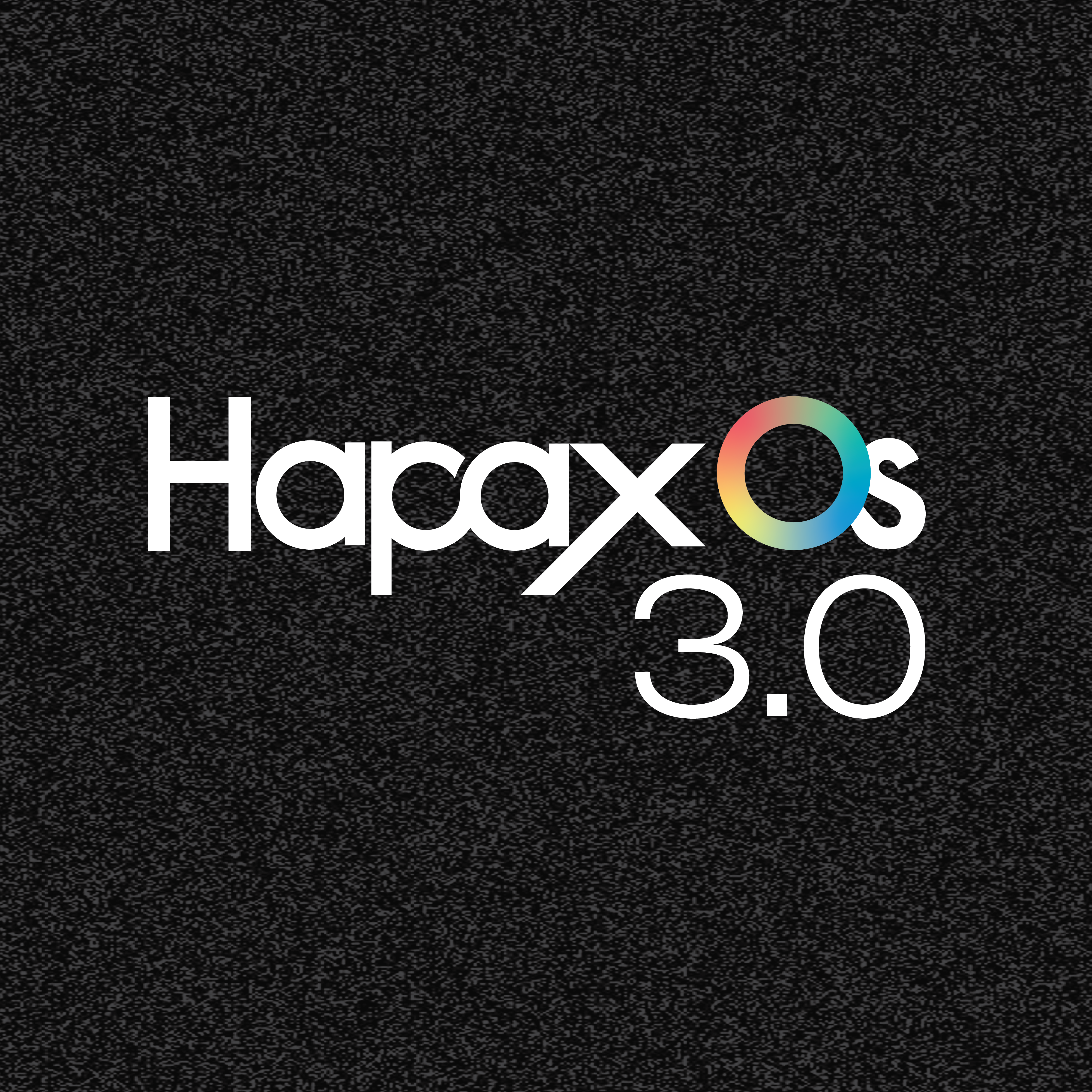
I have my Hapax connected to the mioXL and confirm it can see all the virtual cables. Bear in mind the mioXL ‘only’ has 10 host reservation slots so in an ease of use scenario you can use 10 of the 16 virtual cables. This is how I have my reservations done (ignore ‘Not Connected’ the Hapax wasn’t on when I took the screenshot).

I have named the ports for the intended instrument and these ports are all then available in the routing screen.

There may be a way to access more than 10 ports by reassigning some of the other mioXL ports but you are still limited to reserving 10 and I stuck with that for simplicity.

1 Like

@ianonhere You can use the Midi DIN ports as well. I do not use port reservation as my studio is Midi din only. The mioXL does give me 12 midi out ports with the MioXL after I configure port 9 Din to 12 Dim to be used (they are not set up from factory to be used by the USB ports). This set up gives me 12 midi Din port just from the MioXL (I use 8 to 10 port out of the mioXl alone). You may be able to configure the USB port for the left over 13 to 16 ports, but I did not test that.

What is this weird “feature” and how can I turn this off? This is very annoying when pressing stop twice is also used for stopping hanging notes on synths.

  • Pattern Mode: Pressing STOP twice now resets the currently playing patterns (on the Matrix pads) to the first Section of the Song.
3 Likes