Hapax and bouncing tracks to DAW

Hello. I have been looking at a bunch of videos about the Hapax to understand how the DAW integration work. There is a USB jack, but not much mentioned about how it actually works with/inside a DAW. Does it turn up as a device that you can select and read/write to from the DAW to bounce parts of a track to the DAW? Does it have a passthrough mode to just send tracks from the DAW to the connected synths on the Hapax midi jacks?

Would love to see a video about how this works if there is one.

This is my main question before pulling the trigger on a Hapax. I hate to have gear that is isolated islands in my studio.

if you use a daw you would normally have the output of daw connected to your synths and route midi from hapax to daw and then to synths. your controller keyboard would be plugged into hapax then to daw and on to synths. audio sync from daw to hapax cv in for very tight sync but no midi from daw to hapax necessarily unless you are bouncing midi to hapax, which doesnt make much sense at least for me. it would create a midi loop which is not desireable imo

1 Like

Considering that the Hapax have usb connection to the daw I guessed that midi note pass between the Hapax and the DAW on that usb connection.

With that assumption I was hoping that the Hapax can either pass the midi from the usb from the daw and on to a synth on one of its midi jacks.

That would be very practical to me. Not having to disconnect synths from the hapax to the midi inteface on the computer and being able to either use the hapax as a sequencer or as an extra midi inteface.

No looping. Just selecting sequencer, through mode or transmit midi to daw track from the Hapax.

Freedom quite simple put.

1 Like

yes i am talking about using usb to communicate to the daw from hapax.

you can always keep your synths plugged into the hapax and use the ‘output fx’ to copy the midi to usb. but this is not convenient imo. hapax is not a midi interface and i dont use it like that but maybe its possible. seems convoluted to me if the point is to bounce to daw. you can pass midi live from hapax through daw to synths for as long as you need to refine sequences on hapax, then record at will.

you can set each tracks input and output so it may indeed do what you describe but im not certain of any limitations. if you bounce to daw, dont you want to issue midi from daw afterward? you can still use live midi through daw from hapax to synths after you bounce. so in essence your daw doesnt need to be in the way of you using synths live so to speak, even after bouncing.

I write my tracks in my studio. At the moment I am using Cubase only. I have tried hardware sequencers before standalone or in my eurorack. But I stopped cause it was to much fuzz to reconnect and rerecord to get the useful bits back inte the track in my DAW again at the proper place.

For me I will never only use a hardware sequencer alone for my music, but I can see myself buying something like Hapax to get a hardware interface to create some parts, sequences if it is easy to sync and bring those parts back into the song. I would like to get a hardware sequencer to use it as a kind of instrument. In some cases it is far easier to test beats and patterns on physical buttons than with a mouse or to play it in on a keyboard.

I doubt I am the only one that would like a new tool as an add on to my existing DAW setup.

well hapax is exactly like that in my setup. its a joy to tool around in. and i bounce to my mpc as well as daw if i wish. but other sequencers are fun to tool around in. they all have their strengths. the force is strong in this one! you wont regret it

1 Like

Good to hear. I wish Hermod or somebody else will post some video or something showing it of in this usecase. If it looks decently smooth I will get one.

I just answered so other poster here on the subject matter. I had problems with the way Hapax does song mode so I decided to use it a sequencer for the parts and then use the computer to arrange it.

Hapax is connected to a MioXL via the Hapax host port. That gives me 12 Midi Din Port (I have a large studio and use only DIN midi). The MioXL then connects all my Thru boxes and direct machines and I use up 8 to 10 Midi din port of the mioXL. I do not use any MPE as I dont have any of those expensive controllers.

The computer is connected to the Hapax Device port. The computer then gives me 16 midi ports with 16 midi channels each. thats a lot of midi control. That is midi in and out from each of those ports.

In the Hapax I can then route what direction the flow of midi goes carefully to control all my gear. I created Hapax instrument Definition to help with quick track names and routing to speed up time.

From this set up I can Creat a song on the hapax, save it. Then load a template on the computer DAW and record in 16 midi channels at a time into the DAW to then arrange it.

After I arrange it I can send the midi back to the Hapax and reroute them to control the Instruments so the computer is the master and I can record audio back into the computer using analog audio Sync via CV1 on the Hapax for accurate clock.

That sounds interesting JDoe. I have a similiar setup now with a couple of old emagic interface (24 channels total, no Hapax yes, I don’t use thru port on my midi gear cause I prefer to keep things as simple as possible. I used to have whole chains of one synth into another to a third synth back in the day when midi interfaces had few ports and highs pricetags, but that was a nightmare when I had to swap something out. The Hapax out will not be able to replace all, but it would be ok for me to hook up a few of my synths to the Hapax for the creative adventures.

Would love to see your setup JDoe. Can you make and share a scetch of the wiring perhaps?

I hope this helps you out. Let me know if this makes sense to you.

The Hapax is Connected from the USB host port to MioXl

Then The Hapax is connected from the USB Device port to the MacPro

2 USB cables total for that section.

At this current set up (I have been trying a lot of different ways) ALL Gear is connected to the MioXL via Kenton Thru boxes and sometimes Directly to the gear. All with Midi Din cables. My Master keyboard controller is connected to the Hapax IN and the MacPro via a MioXM.

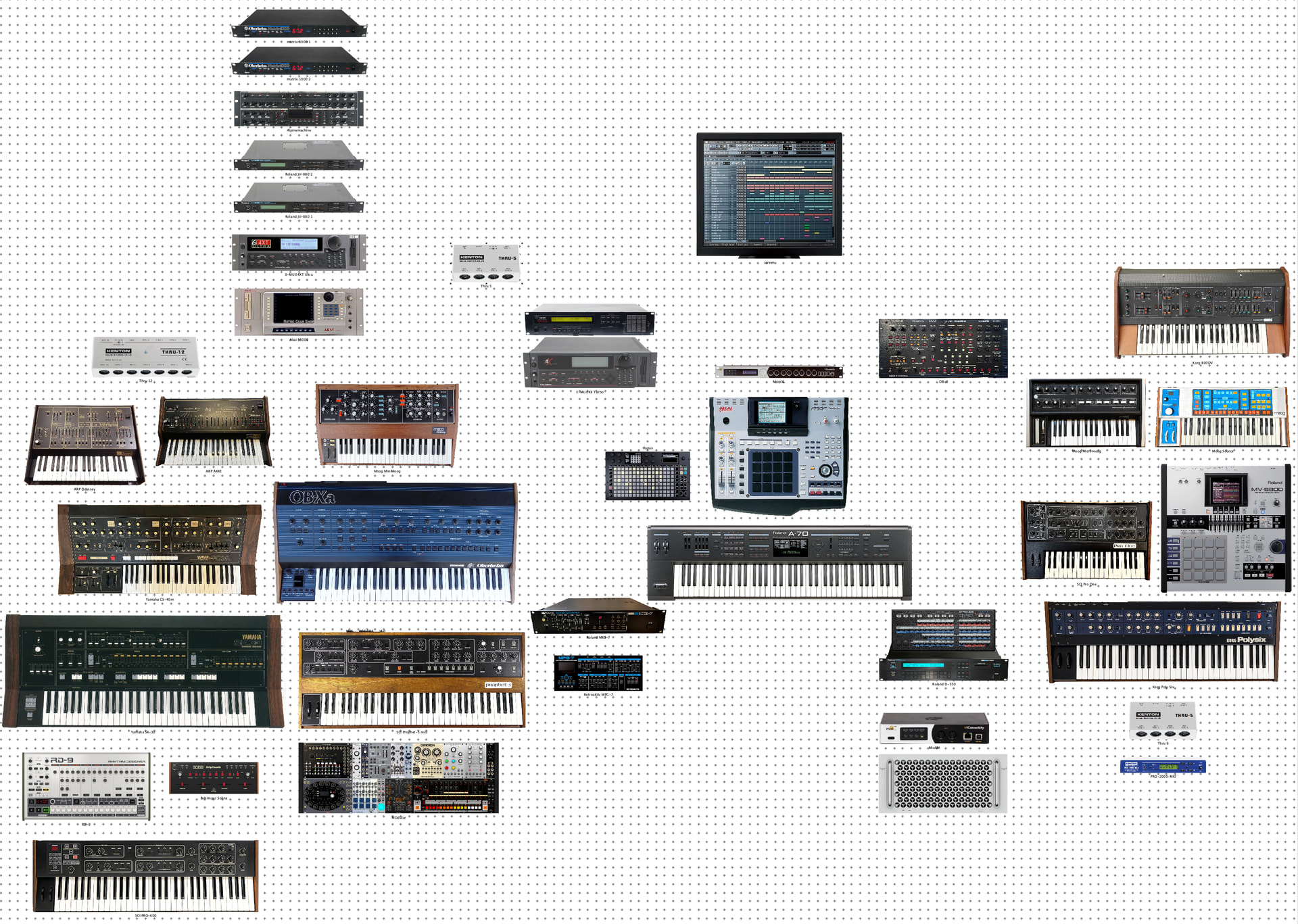
Below is the set up from the MioXL to the gear.

Midi Channels are on the left (CH1, CH12 and so on). Blank is for unused Midi channels. (Play Live) are units that I play live at times. The picture below is with out wires connected since I use the picture to see how things are in the studio before connecting them. They are connected now and working but I take my time to make sure I like it before making the wires in Program form so I have a picture of it. All wires are done with Paper/ then text so I can have a map of what connects to what for midi channels. All Audio wires have separate Pictures and paper/ and Text so I can keep track of channels counts and room to grow. Soundcard is RME MadiFX system.

MioXL: OUT 1

HOST PORT 1 - To Black Custom THRU Box 6 ports - To Gear

CH 1 - Roland MKS-7 - bass

CH 2 - Roland MKS-7 - chord

CH 3 - Roland MKS-7 - Melody

CH 4 - Roland D-550

CH 5 - Korg Poly Six

CH 6 - Oberheim OB-8

CH 7 - Blank

CH 8 - Kenton Pro 2000 - to Moog Source

CH 9 - Blank

CH 10 - Roland MKS-7 - TR-707 Drum Track

CH 11 - Kenton Pro 2000 - To PRO-1

CH 12 - Kenton Pro 2000 - To Korg DV800 (PLAY LIVE)

CH 13 - Kenton Pro 2000 - To Korg DV800 (PLAY LIVE)

CH 14 - Kenton Pro 2000 - To Moog Micro Moog

CH 15 - Blank

CH 16 - Blank


MioXL: OUT 2

HOST PORT 2 - to Kenton THRU box 12 ports - To Gear

CH 1 - Oberheim OB-Xa

CH 2 - Westlich Performer Modular - ARP Axxe

CH 3 - Encore Electronics Expressionist - ARP Odyssey MK1 (PLAY LIVE) Need Midi kit

CH 4 - Westlich Performer Modular - Small Dreadbox Moduler system

CH 5 - SCI Prophet-600 gigli

CH 6 - SCI Prophet-5 (PLAY LIVE) need Midi kit

CH 7 - Minimoog Model D

CH 8 - Matrix-1000 set

CH 9 - System 80 880 Drum Track

CH 10 - RD-9 909 Drum Track

CH 11 - Yamaha SK-30 Bass Solo (midi)

CH 12 - Yamaha SK-30 Organ (midi)

CH 13 - Yamaha SK-30 Synth/Pads (midi)

CH 14 - Behringer Solina

CH 15 - Encore Electronics Expressionist - Yamaha CS-40m (PLAY LIVE) (midi)

CH 16 - Westlich Performer Modular - for Clock

----------------------------

MioXL: OUT 3

HOST PORT 3 - to Kenton Thru box 5 ports - To Gear

CH 1 - Yamaha TX-802

CH 2 - Yamaha TX-802

CH 3 - Yamaha TX-802

CH 4 - Yamaha TX-802

CH 5 - Yamaha TX-802

CH 6 - Yamaha TX-802

CH 7 - Yamaha TX-802

CH 8 - Yamaha TX-802

CH 9 - Roland JV-880 Synth 1

CH 10 - Roland JV-880 Drum

CH 11 - Roland JV-880 Synth 2

CH 12 - Roland JV-880 Drum

CH 13 - Blank

CH 14 - Blank

CH 15 - Blank

CH 16 - Blank

----------------------------

MioXL: OUT 4

HOST HOST PORT 4 - To Akai MPC-4000 - Use all 16 midi channels

--------------------

MioXL: OUT 5

HOST PORT 5 - To Roland MV-8800 - Use all 16 midi channels

-----------------------------------------------------------

MioXL: OUT 6

HOST PORT 6 - to E-MU E4X Turbo - Use all 16 midi channels

-----------------------------------------------------------

MioXL: OUT 7

HOST PORT 7 - to E-MU E4XT Ultra A input - Use all 16 midi channels

-----------------------------------------------------------

MioXL: OUT 8

HOST PORT 8 - to E-MU E4XT Ultra B input - Use all 16 midi channels

-----------------------------------------------------------

MioXL: OUT 9

HOST PORT 9 - to Akai S6000 A IN - Use all 16 midi channels

-----------------------------------------------------------

MioXL: OUT 10

HOST PORT 10 - to Akai S6000 B IN - Use all 16 midi channels

-----------------------------------------------------------

MioXL: OUT 11

HOST PORT 11 - to BLANK

-----------------------------------------------------------

MioXL: OUTS 12

PORT 12 - to BLANK not used
1 Like

Thanx a lot JDoe. That explains your setups wiring a lot.

So if I understand you right. No synth is connected to the Hapax. The Hapax sits between the Mac and the Midi interface. It seems to me that you use the Hapax one channel at a time and switch channels in the DAW. Am I right?

It seems to me you really go for what you like. Never seen so many TX802 and 880s in a setup. Respect for that dedication. I have a hard time to commit to one “platform” so much. I have 1 JD880 and 1 FS1r.

Mac studio is a solid investment. Really nice design on that hardware. Is it M-silicon or intel?

Yes the Hapax sets between the Mac and the midi interface but the Hapax is the master in a sense that I change tracks in the Hapax not the mac. In this set up I can switch from using the Hapax as the master or turn the Hapax as a midi interface and have the Mac as the master. It is very flexible. I can with out changing wires record the midi out of the Hapax in Logic or reaper dumping 16 tracks at the same time or send midi from the computer into the Hapax 16 midi channels at the same time.

So I can start the song on the Hapax, Arrange the song in the computer, and play back the full song thru the Hapax from the computer to record into Logic (or reaper) locking the Hapax with CV clock and get really good results.

As for the gear I only have 1 TX802. What you see in the charts there are the Midi channels set aside for it on that midi port. The picture shows how many of each item I have. So when MioXL midi DIN port 10 is connected to Akai S6000 B input it means that the Akai gets access to all 16 midi channels (the Akai S6000 is 32 part multi and can be set up to 128 multi) So when you see the TX802 8 times it means I have 1 TX802 connected to 1 Kenton Thru box togeather with 2 JV-880 Rack modules all on 1 Midi DIN port on the MioXL. The TX802 gets 8 midi channels for it and the JV-880 each get 2 channels (total of 4 midi channels for both of them). So MioXL Midi Din port 3 has one midi cable going to the Kenton Thru 5 Box and 3 midi Cables come out of that to connect 1 Yamaha TX802 (use 8 midi channels) and 2 JV880 (both use 4 midi channels).

As for the computer its a 2019 Mac pro Intel. I have M-Sillicon Laptop but the 28 core intel can play way more tracks (it has high RAM and better Sound card options). So when its time to record the Audio every item in the studio can be accessed by the Hapax and the Computer depending on how you want to work. I do not need to unplug anything with this set up. All I have to do is change the ports on the Hapax and load my templeats on either the computer or the Hapax. I have been recording in Logic as of late since I got a good lock Via CV clock to the Hapax. OS 3.0 on the Hapax allowed me to use the computer for song mode and Hapax for very fast sequencing.

I hope I cleared any misunderstanding. I want to help others in any way they want to use the Hapax. These are all tools for the end goal to make some music. Thanks for your time.

here is another way to look at the actual connections from the Midi Thru boxes to the gear. The one above shows the midi channels used this one just showes how many items are connected to each Thru box.

MioXL: OUT 1

HOST PORT 1 - To Black Custom THRU Box 6 ports - To Gear

Black Custom THRU Box 6 ports 1 - Roland MKS-7 - bass

Black Custom THRU Box 6 ports 2 - Roland D-550

Black Custom THRU Box 6 ports 3 - Korg Poly Six

Black Custom THRU Box 6 ports 4 - Oberheim OB-8

Black Custom THRU Box 6 ports 5 - Kenton Pro 2000 - to Moog Source / To PRO-1 / To Korg DV800 / To Moog Micro Moog (Kenton Pro2000 is 5 part multi Cv/gate converter)

----------------------------

MioXL: OUT 2

HOST PORT 2 - to Kenton THRU box 12 ports - To Gear

Kenton THRU box 12 ports 1 - Oberheim OB-Xa

Kenton THRU box 12 ports 2 - Westlich Performer Modular - CH2 ARP Axxe / Ch4 Small Dreadbox Moduler system / Ch 16 Clock

Kenton THRU box 12 ports 3- SCI Prophet-600 gigli

Kenton THRU box 12 ports 4 - Minimoog Model D

Kenton THRU box 12 ports 5 - Matrix-1000 set

Kenton THRU box 12 ports 6 - System 80 880 Drum Track

Kenton THRU box 12 ports 7- RD-9 909 Drum Track

Kenton THRU box 12 ports 8 - Yamaha SK-30 Tubbutech midi kit (3 part milti)

Kenton THRU box 12 ports 9 - Behringer Solina

Kenton THRU box 12 ports 10 - Encore Electronics Expressionist - Yamaha CS-40m

----------------------------

MioXL: OUT 3

HOST PORT 3 - to Kenton Thru box 5 ports

Kenton Thru box 5 ports 1 - Yamaha TX-802

Kenton Thru box 5 ports 2 - Roland JV-880 Synth 1

Kenton Thru box 5 ports 3 - Roland JV-880 Synth 2

----------------------------

MioXL: OUT 4

HOST HOST PORT 4 - To Akai MPC-4000 - Use all 16 midi channels

--------------------

MioXL: OUT 5

HOST PORT 5 - To Roland MV-8800 - Use all 16 midi channels

-----------------------------------------------------------

MioXL: OUT 6

HOST PORT 6 - to E-MU E4X Turbo - Use all 16 midi channels

-----------------------------------------------------------

MioXL: OUT 7

HOST PORT 7 - to E-MU E4XT Ultra A input - Use all 16 midi channels

-----------------------------------------------------------

MioXL: OUT 8

HOST PORT 8 - to E-MU E4XT Ultra B input - Use all 16 midi channels

-----------------------------------------------------------

MioXL: OUT 9

HOST PORT 9 - to Akai S6000 A IN - Use all 16 midi channels

-----------------------------------------------------------

MioXL: OUT 10

HOST PORT 10 - to Akai S6000 B IN - Use all 16 midi channels

-----------------------------------------------------------

MioXL: OUT 11

HOST PORT 11 - to BLANK

-----------------------------------------------------------

MioXL: OUTS 12

PORT 12 - to BLANK not used

----------------------------

Thank you a lot for taking all the time to write this very comprehensive answer. This is just the answer I was looking for. What I imagine myself doing is to have the hapax between some of my synths to make basslines, arpeggios and drum tracks that I find uninspirational and tedious to do with mouse clicking.

Thank you for explaining your setup. Now I see i got confused and missed that it was the same machine on different channels on the same port by the double JV880 drum tracks and assumed you had a lot of TX802 as well. It is rare but it happens. I have seen guys having setups with a lot of the same. The most I have seen is 8 Kawai K3m or 6 Akai S1000.

I think we have similar preferences for synths. I also have the the JV880. I like the sound, but I found the method to load sounds from the vintage board clumsy and got a JV2080 to have quicker access to the vintage board sound. There is a slight difference in sound thought. The JV880 sounds a little smother and bassier to me. Or perhaps the JV2080 is a little brighter and clearer. I the mix I can’t tell though.